Choosing the right server management panel is one of the most critical decisions a hosting provider or system administrator will make in 2026. The panel you choose determines your security posture, your operational efficiency, and ultimately the experience your customers receive.
This guide compares the leading server management panels available today — from enterprise-grade commercial solutions to free open-source alternatives — with a focus on what actually matters: security architecture, feature completeness, long-term reliability, and total cost of ownership.
The 2026 Server Panel Landscape
The server management panel market has changed significantly in the past few years. Legacy panels are showing their age, new entrants are challenging the status quo, and several high-profile security incidents have forced the industry to reconsider what "good enough" really means when it comes to account isolation and server security.
Top Server Management Panels Ranked
1. Panelica — Best Overall for Security and Value
Panelica is the newest entrant in the server panel market, but it has quickly established itself as the most architecturally modern option available. Built from the ground up on Go and React, Panelica introduces a concept called Isolated Control Architecture (ICA) — a five-layer tenant isolation system that includes Cgroups v2, Linux Namespaces, SSH Chroot Jails, per-user PHP-FPM pools, and granular Unix permissions.
Unlike panels that bolt on security as an afterthought, Panelica was designed with isolation as its foundational principle. Every feature — Docker Manager with 99 app templates, WordPress Toolkit with a proprietary two-layer caching engine, Git Deploy, automated migration, Cloudflare integration — is built on top of this isolation layer.
| Feature | Details |
|---|---|
| Isolation | 5-layer ICA (Cgroups v2, Namespaces, Chroot, PHP-FPM, Unix Perms) |
| Tech Stack | Go 1.24, React 19, PostgreSQL 17 |
| Docker | 99 one-click app templates with RBAC |
| WordPress | Built-in toolkit with proprietary two-layer caching engine |
| Migration | Automated from cPanel, Plesk, DirectAdmin, and others |
| API | 246 RESTful endpoints |
| Pricing | From $0/month (Starter plan with 14-day bonus), Professional from $4.99/mo |
| OS Support | Ubuntu 22.04, 24.04, Debian 12, 13 |
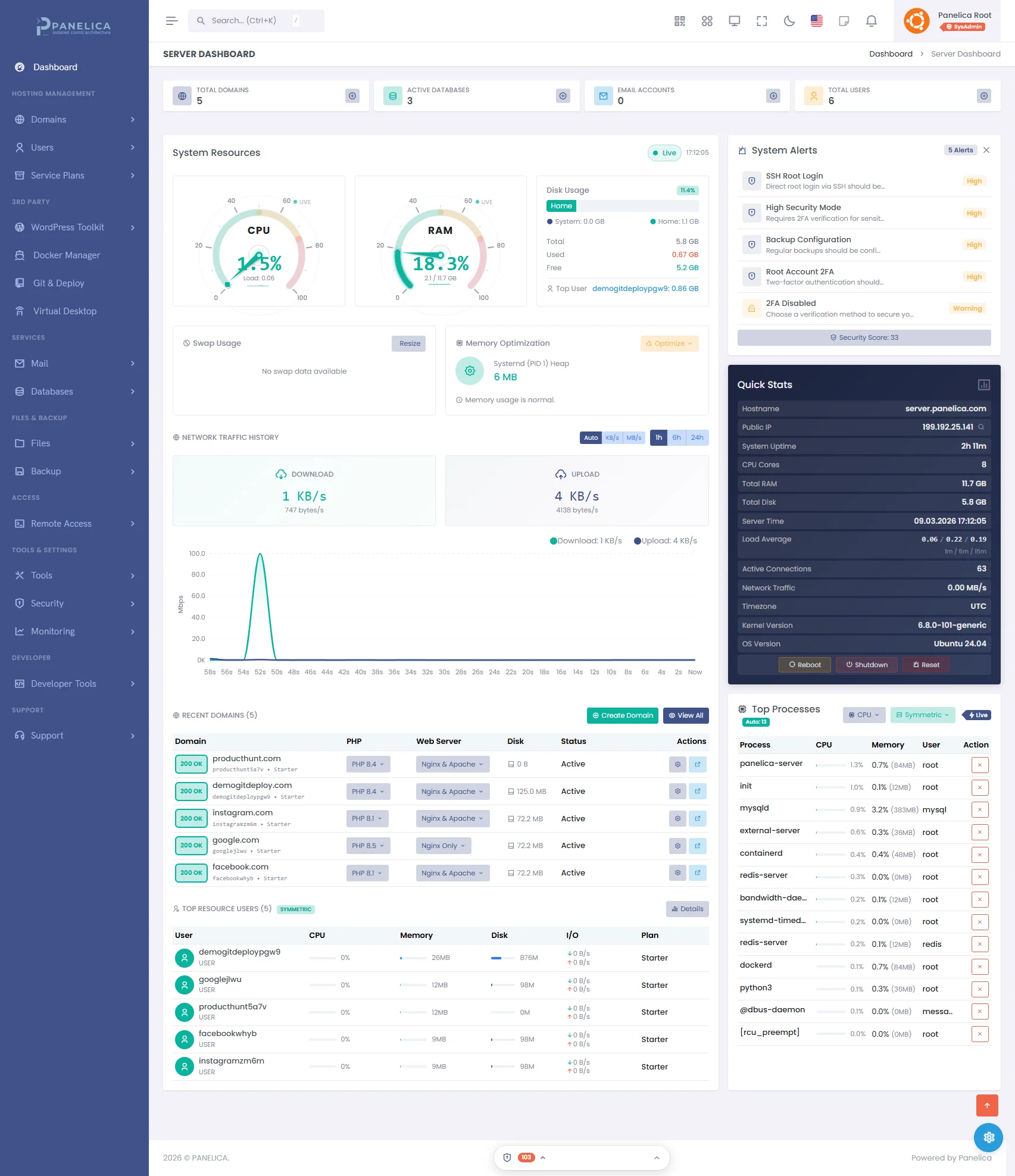
Panelica Dashboard — Modern server management at a glance
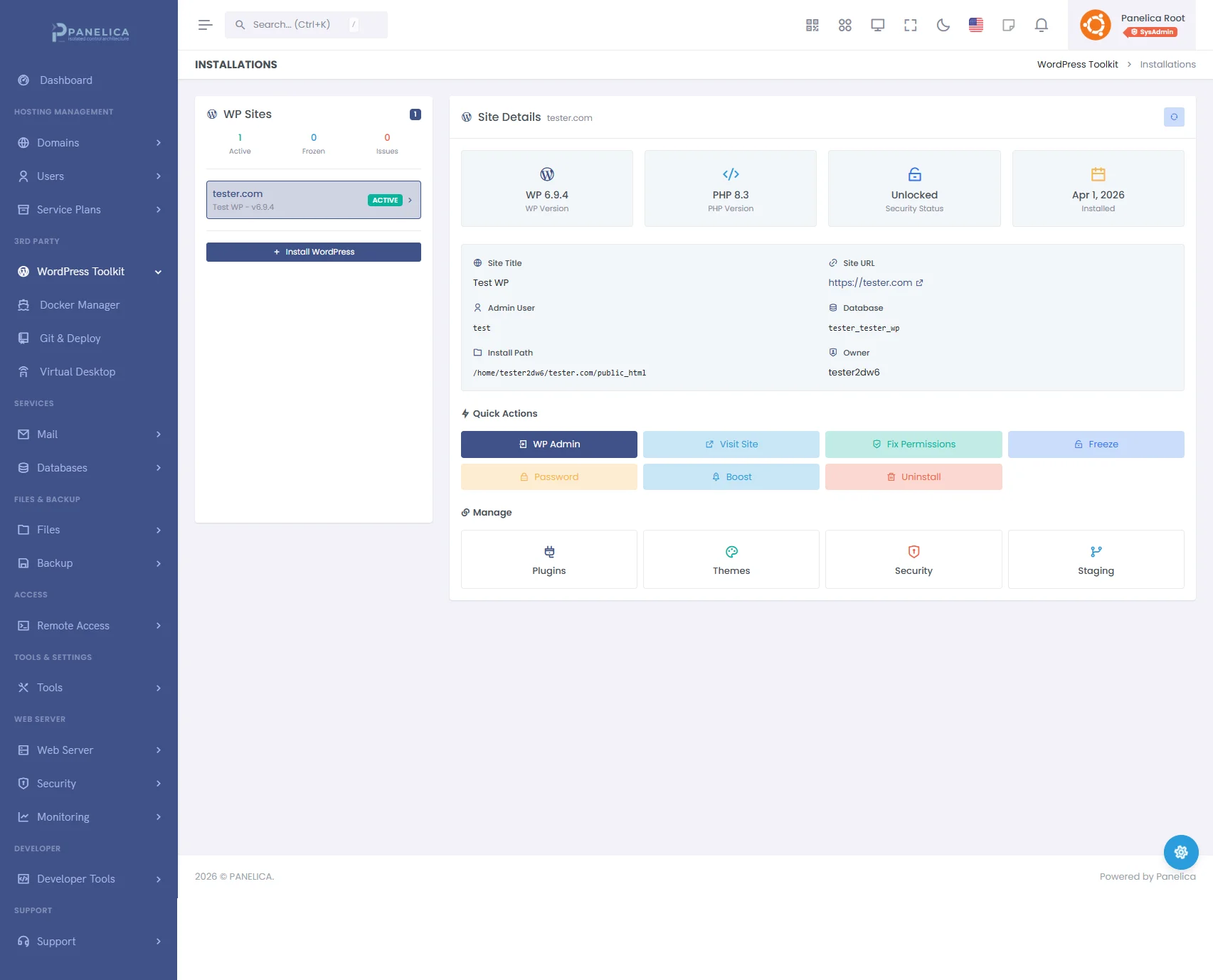
Panelica WordPress Toolkit — Complete WordPress management from your panel
Best for: Hosting providers, agencies, and system administrators who prioritize security and want a modern, all-inclusive panel without per-feature add-on costs.
2. cPanel — The Industry Standard
cPanel has been the default choice for shared hosting providers for over two decades. Its market dominance means extensive documentation, a large ecosystem of plugins, and broad familiarity among system administrators. However, its age shows in several areas — the architecture predates modern container isolation, and the licensing model has become increasingly expensive since the 2019 pricing overhaul.
| Feature | Details |
|---|---|
| Isolation | CloudLinux CageFS (separate purchase), basic PHP-FPM |
| Tech Stack | Perl, PHP (legacy codebase) |
| Docker | Not natively supported |
| WordPress | WP Toolkit (Starter free, full version paid add-on) |
| Migration | Transfer Tool (cPanel-to-cPanel only) |
| API | UAPI and WHM API |
| Pricing | From $15/month (Solo), up to $45/month (Premier) |
| OS Support | AlmaLinux, Rocky Linux, Ubuntu (limited) |
Panelica now matches CloudLinux's legacy-PHP coverage (PHP 5.6 through 7.4) on Ubuntu and Debian through a transparent Docker shim — without the per-server license cost or RHEL-family lock-in. The same per-domain dropdown selects either modern PHP 8.x (native PHP-FPM) or legacy 5.6/7.x (Docker-isolated runtime).
Best for: Established hosting providers with existing cPanel infrastructure who need ecosystem compatibility and are willing to pay premium pricing.
3. Plesk — Developer-Friendly with Extensions
Plesk positions itself as a developer-oriented panel with strong Git integration and a marketplace of extensions. It supports both Linux and Windows, which gives it a unique advantage in mixed-environment deployments. The extension model means the base panel is leaner, but essential features often require additional purchases.
| Feature | Details |
|---|---|
| Isolation | Basic PHP-FPM isolation, no kernel-level namespace support |
| Tech Stack | PHP, JavaScript |
| Docker | Docker extension available |
| WordPress | WP Toolkit included in higher tiers |
| Migration | Plesk Migrator (cPanel and Plesk sources) |
| API | XML-RPC and REST API |
| Pricing | From $11/month (Web Admin), up to $45/month (Web Pro) |
| OS Support | Linux (various), Windows Server |
Best for: Developers and agencies managing a small number of servers who value Git workflows and need Windows support.
4. DirectAdmin — Lightweight and Affordable
DirectAdmin has carved out a niche as the lightweight, affordable alternative to cPanel. It consumes fewer server resources, offers straightforward licensing, and provides a clean interface. However, it lacks the depth of features that larger panels offer, particularly in areas like Docker management, advanced security tools, and migration capabilities.
| Feature | Details |
|---|---|
| Isolation | CageFS via CloudLinux (separate purchase) |
| Tech Stack | C++, PHP |
| Docker | Not supported |
| WordPress | No built-in toolkit |
| Migration | Basic cPanel import |
| Pricing | From $2/month (Personal), up to $29/month (Lite+) |
| OS Support | AlmaLinux, Rocky Linux, Debian, Ubuntu |
Best for: Budget-conscious administrators running smaller servers who need basic management without premium features.
Free and Open-Source Panels: The Hidden Cost
The appeal of a free server management panel is understandable. Zero licensing cost sounds attractive, especially for administrators just starting out or managing personal projects. However, the server management industry has learned some painful lessons about the true cost of "free" software.
The Security Reality
Free panels operate on volunteer time, limited funding, or business models that may not prioritize long-term security maintenance. When a critical vulnerability is discovered, the response time and patch quality depend entirely on whether the maintainers have the resources — and the motivation — to address it promptly.
CyberPanel serves as a cautionary example. In late 2024, a critical remote code execution vulnerability (CVE-2024-51567) was actively exploited in the wild, allowing attackers to gain root access to thousands of servers running the panel. The vulnerability existed in the /dataBases/upgrademysqlstatus endpoint and allowed unauthenticated command injection. Thousands of servers were compromised before a patch was made available, and the incident highlighted the risks inherent in relying on a free panel backed by a small development team with limited security audit resources.
This is not an isolated case. Free panels have historically been slower to receive security patches, less likely to undergo professional security audits, and more vulnerable to supply chain attacks due to smaller contributor pools.
The Sustainability Question
Building and maintaining a server management panel is a significant engineering undertaking. It requires continuous attention to security patches, compatibility with evolving operating systems, new PHP and database versions, SSL certificate automation, DNS management, and dozens of other moving parts.
Sustainable software development requires sustainable funding. When a product is offered entirely for free, it is reasonable to ask: who is paying the engineers? Who is funding the security audits? Who will be available to release an emergency patch at 2 AM on a Saturday when a zero-day is discovered?
Commercial panels have a direct financial incentive to protect their users — their business depends on it. This alignment of incentives is not a minor detail. It is a fundamental factor in long-term reliability.
Popular Free Panels and Their Trade-offs
| Panel | Strengths | Concerns |
|---|---|---|
| CyberPanel | OpenLiteSpeed integration, free | Critical RCE vulnerability (CVE-2024-51567), small security team, slow patch cycle |
| HestiaCP | Clean UI, active community | Limited isolation, no Docker, small development team |
| CloudPanel | Modern interface, Nginx-based | Limited feature set, no migration tools, single-developer risk |
| Webmin/Virtualmin | Highly configurable, long history | Complex interface, dated architecture, steep learning curve |
| ISPConfig | Multi-server support | Complex setup, dated UI, limited community growth |
| aaPanel | Simple interface | China-based development, data privacy concerns, limited transparency |
Head-to-Head Comparison: 2026 Server Panels
| Capability | Panelica | cPanel | Plesk | DirectAdmin | Free Panels |
|---|---|---|---|---|---|
| Kernel-Level Isolation | 5-layer ICA | CloudLinux (paid) | Basic | CloudLinux (paid) | None/Minimal |
| Docker Management | 99 templates | No | Extension | No | Varies |
| WordPress Toolkit | Included + proprietary cache | Paid add-on | Higher tiers | No | Varies |
| Automated Migration | Multi-panel | cPanel only | Limited | Basic | No |
| Git Deploy | Built-in CI/CD | No | Built-in | No | No |
| Firewall + WAF | Included | Paid (CSF/CXS) | Paid extension | Paid | Varies |
| Malware Scanner | Included | Paid (ImunifyAV) | Paid extension | No | Varies |
| API Endpoints | 246 | 200+ | 100+ | Limited | Limited |
| Theme/Branding | 42 presets | Limited | Custom themes | Skins | Limited |
| Multi-Language | 30 languages | 30+ | 30+ | 20+ | Varies |
| Starting Price | $0 (trial) | $15/mo | $11/mo | $2/mo | Free |
| Security Audits | Continuous | Regular | Regular | Periodic | Rare/None |
What to Look for in a Server Panel in 2026
1. Account Isolation Is Non-Negotiable
If one compromised account on your server can affect other accounts, your panel has a fundamental architecture problem. In 2026, kernel-level isolation through Cgroups v2 and Linux Namespaces should be considered baseline, not premium. Panels that rely solely on PHP open_basedir or file permissions for tenant separation are using techniques designed for a different era.
2. Beware of the Add-on Tax
A panel that costs $15/month but requires $30/month in add-ons for essential features (firewall, malware scanning, WordPress management, backup) is not a $15 panel. Calculate the total cost of ownership, including all the extensions and third-party tools you will actually need in production.
3. Migration Capability Matters
Vendor lock-in is a real concern. A panel that makes it easy to migrate in — and does not make it artificially difficult to migrate out — demonstrates confidence in its own product. Look for panels that support automated migration from multiple sources, not just from themselves.
4. Modern Tech Stack Signals Long-Term Viability
A panel built on a modern, maintainable tech stack (Go, Rust, modern JavaScript frameworks) is more likely to keep pace with evolving server technologies than one built on legacy Perl or aging PHP codebases. The underlying technology directly affects performance, security patch turnaround, and the ability to attract contributors.
Conclusion
The server management panel you choose in 2026 should reflect the current state of the industry — not the state of the industry a decade ago. Security architecture, feature completeness without excessive add-on costs, and sustainable development practices are the three pillars that separate panels built for the future from panels coasting on legacy momentum.
For administrators who prioritize security and want everything included from day one, Panelica offers the most complete package on the market. For those with existing infrastructure invested in cPanel or Plesk, the migration path has never been smoother. And for those considering free alternatives, the question to ask is not "what does it cost today?" but "what could it cost if something goes wrong?"
The best server panel is the one that protects your servers, your customers, and your business — and does so reliably, year after year.
Thinking about switching from legacy panels?
See how Panelica compares feature-by-feature, including real 2026 pricing and migration steps.
See the full comparison