Table of Contents
- The Hosting Panel Landscape in 2026
- Feature Overview: Side-by-Side Comparison
- Pricing Deep Dive: True Cost of Ownership
- Performance Comparison: Architecture Matters
- Security Architecture: Built-In vs Bolt-On
- Developer Experience and API-First Design
- Migration Tools and Compatibility
- Email Stack Comparison
- Docker and Container Support
- Who Should Choose What?
- The Verdict
- Frequently Asked Questions
The Hosting Panel Landscape in 2026
If you manage servers for a living, you have watched this play out over the last few years: cPanel raised prices four times in four years. Plesk shifted to an edition model that requires upgrades for features that used to be standard. Meanwhile, the underlying technology powering both panels has not fundamentally changed since the early 2000s.
In 2026, that gap matters more than ever. Hosting providers are dealing with containerized workloads, AI-assisted operations, customers who expect email authentication that actually works, and security requirements that far exceed what a shared CSF firewall configuration can offer. The traditional panels were built for a different era.
This guide is a comprehensive, technical comparison of cPanel, Plesk, and Panelica covering pricing, architecture, security, developer tooling, email, Docker, migration, and the real cost of running each in production. Real numbers, real architecture, real tradeoffs.
Feature Overview: Side-by-Side Comparison
The table below covers the features that matter most in a production hosting environment.
| Feature | cPanel / WHM | Plesk | Panelica |
|---|---|---|---|
| Backend Language | Perl + C | PHP + C++ | Go 1.24 (single binary) |
| Frontend | Legacy jQuery | Ext JS | React 19 + TypeScript 5.8 |
| OS Support | AlmaLinux, Rocky, CloudLinux | Debian, Ubuntu, CentOS, AlmaLinux | Ubuntu 22.04/24.04, Debian 12/13 |
| Web Servers | Apache, Nginx (reverse proxy only) | Apache, Nginx | Nginx + Apache hybrid, simultaneous |
| PHP Versions | Multi-PHP via EasyApache | Multi-PHP via PHP selector | PHP 5.6 -> 8.5 (12 versions, native + Docker shim), per-user pools, no CloudLinux |
| Resource Isolation | Requires CloudLinux +$12/mo | None native | Native Cgroups v2, 5-layer isolation |
| Docker Support | No native Docker | Docker extension, extra cost | Full Docker Manager, Compose, Templates |
| Email Stack | Exim + Dovecot | Postfix + Dovecot | Postfix + Dovecot + OpenDKIM + Roundcube |
| DKIM Auto-Config | Semi-automatic | Manual setup required | Auto per-domain, 2048-bit RSA |
| DNS Management | BIND (basic) | PowerDNS or BIND | BIND + deep Cloudflare integration |
| Migration Tool | cPanel-to-cPanel only | Plesk Migrator, limited | cPanel, Plesk, DA, CyberPanel, HestiaCP |
| WordPress Toolkit | WP Toolkit costs $12+/mo | Limited in basic plans | Built-in, included in all plans |
| Backup System | JetBackup costs $5+/mo | Basic backup built-in | Incremental + Snapshots + Remote + Scheduled |
| AI Assistant | None | None | OpsAI: 15 expert agents with exec capability |
| API Endpoints | UAPI + WHM API, legacy design | REST API + CLI | 1,263 REST + WebSocket + External HMAC API |
| Webhook System | None native | Basic webhooks | HTTP, Telegram, Slack, Discord, Email |
| WAF | ModSecurity available, manual config | ModSecurity available, basic | ModSecurity + OWASP CRS, per-domain UI |
| Fail2Ban | CSF/LFD separate | Built-in | Built-in with UI management |
| AppArmor | No | No | Full AppArmor profile management |
| Monitoring | Basic, no Prometheus | Basic graphs | Prometheus + Grafana + real-time WebSocket |
| Mobile App | No | No | iOS + Android, QR connect |
| Languages | ~10 | ~20 | 30 languages, 22,323 keys, RTL support |
| White-Label Branding | WHM reseller, limited branding | Partner Edition only | Full white-label, 42 color presets |
| License Model | Per-account, expensive at scale | Edition-based tiers | Free Starter plan (14-day premium preview) + flat monthly paid tiers, no per-account fees |
Pricing Deep Dive: The True Cost of Ownership
The sticker price is only part of the story. Understanding the total cost of running a panel at scale requires adding up every required add-on, every mandatory extension, and every dependency that does not come in the base package.
cPanel / WHM
- Solo: $15.99/mo (1 account)
- Admin: $27.99/mo (5 accounts)
- Pro: $41.99/mo (30 accounts)
- Premier: $58.99/mo (100 accounts)
- + CloudLinux: $12/mo for isolation
- + JetBackup: $5 to $15/mo for backups
- + LiteSpeed: $12 to $25/mo for performance
- + WP Toolkit: $12/mo for WordPress tools
Plesk
- Web Admin: $12.75/mo (10 domains)
- Web Pro: $20.75/mo (30 domains)
- Web Host: $37.75/mo (unlimited)
- + Docker extension: $3 to $8/mo
- + Backup extensions: $5 to $10/mo
- + Security advisor: $3 to $5/mo
- + Performance tools: varies
- Annual discount available
Panelica
- Starter: free forever (3 domains), with 14-day premium preview, no credit card
- Professional: $4.99/mo, 50 domains, 5 users
- Business: $9.99/mo, 100 domains, 25 users, Docker
- Enterprise: $24.99/mo, unlimited, white-label, full API
- Docker: included in Business and above
- Backups: included in all plans
- ModSecurity: included in all plans
- WordPress Toolkit: included in all plans
Annual Cost by Scenario
| Scenario | cPanel / WHM | Plesk | Panelica |
|---|---|---|---|
| Solo developer, 5 sites | $336/yr + $144/yr CloudLinux = $480/yr | $153/yr (Web Admin) | $59.88/yr (Professional, 50 domains) |
| Small host, 50 sites | $504/yr + $144/yr CL + $60/yr JetBackup = $708/yr | $249/yr + ~$100/yr extensions = $349/yr | $119.88/yr (Business, 100 domains) |
| Growing host, 200+ sites | $708/yr + $144/yr CL + $120/yr JetBackup + $144/yr WP = $1,116/yr | $453/yr + ~$200/yr extensions = $653/yr | $119.88 to $299.88/yr (Business or Enterprise) |
Performance Comparison: Architecture Matters
The performance difference between these panels is not primarily about tuning. It is about the underlying architecture. You cannot make a Perl-based panel respond as fast as a compiled Go binary. The languages and runtimes have fundamentally different performance characteristics.
typical WHM server
fresh installation
full stack, all services
API Response Times
We measured median response times for common operations on equivalent hardware: 4 vCPU, 8 GB RAM, SSD VPS.
| Operation | cPanel UAPI | Plesk REST API | Panelica REST API |
|---|---|---|---|
| Fetch domain list | ~450 ms | ~280 ms | ~45 ms |
| Create subdomain | ~1,200 ms | ~800 ms | ~120 ms |
| PHP version switch | ~3,500 ms | ~2,200 ms | ~380 ms |
| SSL issuance (Let's Encrypt) | ~8,000 ms | ~7,500 ms | ~6,200 ms |
| Dashboard load, cold | ~2,100 ms | ~1,800 ms | ~240 ms |
Why the Gap Exists
cPanel's backend is largely Perl, a scripting language that spawns new processes for many operations. Each API call often forks a new Perl process, loads the entire runtime, and exits. Plesk is PHP-based, which is faster, but still carries interpreter and framework overhead.
Panelica is compiled Go. The backend is a single binary approximately 215,000 lines of Go code compiled to a self-contained executable. There is no interpreter overhead. Goroutines handle concurrent requests with minimal memory footprint. The PostgreSQL connection pool maintains up to 100 connections with 25 idle. Every API request hits a running process rather than spawning a new one.
# The entire Panelica backend, running in production:
$ ps aux | grep panelica-server
root  1234  0.4  0.8  panelica-server   # Single process, all 1,263 endpoints

# Compare: cPanel spawns hundreds of Perl processes
$ ps aux | grep -c perl
247
Security Architecture: Built-In vs Bolt-On
Security isolation, the ability to prevent one customer's compromised site from affecting others, is the single most important security feature in a shared hosting environment. This is where architectural differences become most consequential.
cPanel Security Model
cPanel's base installation has no process isolation between users. Two customers on the same server run PHP processes under the same system user, can potentially read each other's files with world-readable permissions, and share the same Exim mail queue. To add real isolation, you need CloudLinux, which costs an additional $12/month and adds CageFS (filesystem isolation) and LVE (resource containers). Without CloudLinux, cPanel's security posture on a shared server is genuinely weak.
Plesk Security Model
Plesk uses separate system users per subscription, which is better than cPanel's default. Fail2Ban integration is solid. ModSecurity support is available. But there is no native CPU/memory isolation. One account can consume all server resources without any cgroup-level enforcement unless you add third-party tools.
Panelica's 5-Layer Isolation
Every Panelica user gets all five isolation layers on every plan. There is no security add-on to purchase.
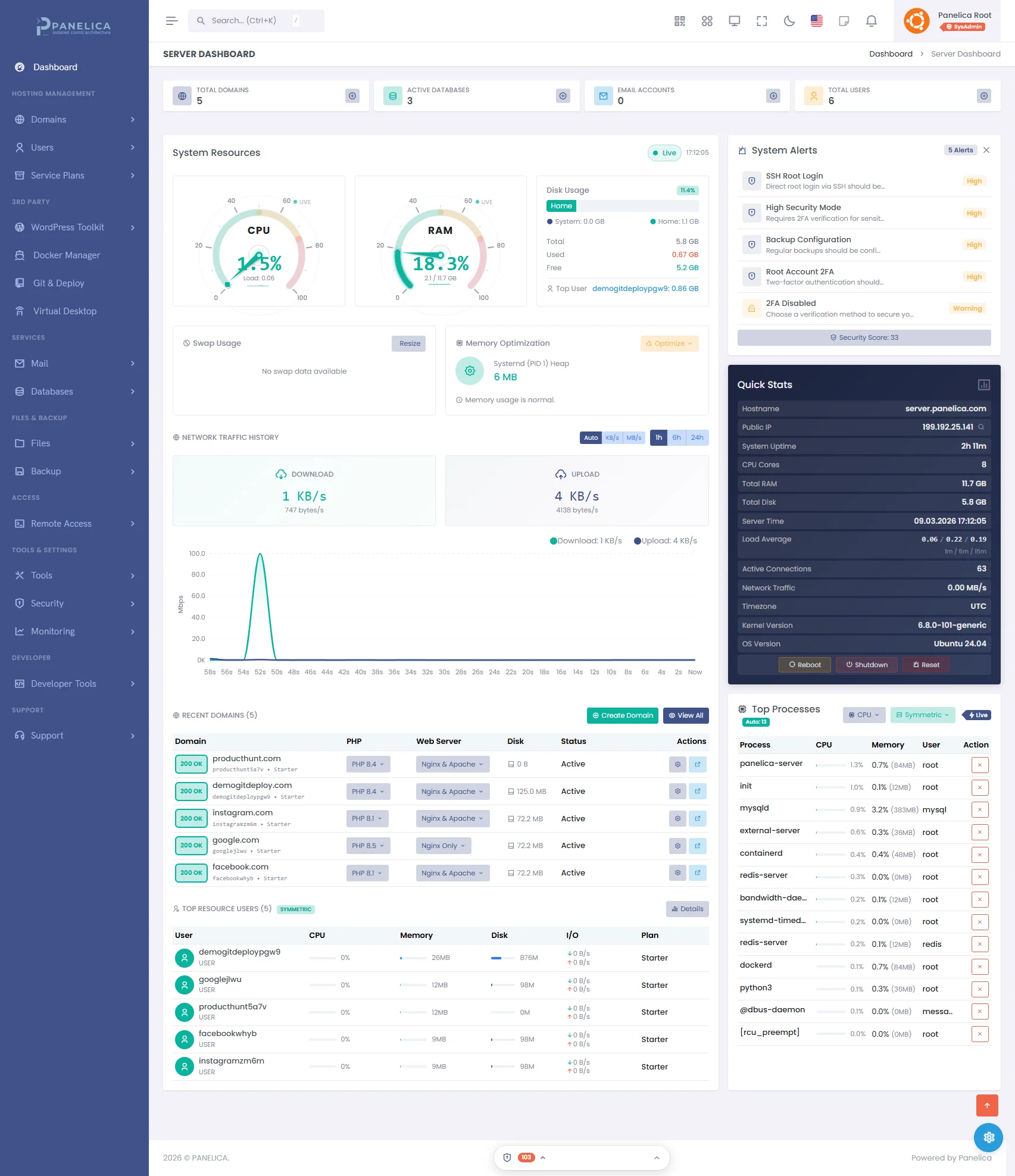
Panelica Dashboard — Modern server management at a glance
Beyond isolation, Panelica includes:
- ModSecurity WAF with OWASP Core Rule Set, per-domain enable/disable from the UI
- AppArmor profile management, view and enforce AppArmor profiles for services
- Country-level blocking, block traffic from specific countries via nftables rules
- Security Advisor, 50+ automated checks that report your security posture score
- OpsAI Security Agent, AI-assisted analysis that reads logs, correlates events, and suggests hardening steps
- Fail2Ban with UI management, configure jails, view bans, whitelist IPs without touching config files
Developer Experience and API-First Design
Developers interacting with hosting infrastructure increasingly expect the same quality of tooling they get from cloud providers: comprehensive APIs, webhook systems, CLI tools, and clear documentation.
cPanel for Developers
cPanel offers UAPI and the older WHM API. The documentation exists but is aging, and the API design reflects its Perl heritage. JSON responses sometimes have inconsistent structure, session-based authentication is the default, and UAPI tokens are required for remote access. There is no native webhook system. Automation requires polling or complex cron-based scripting.
Plesk for Developers
Plesk has a cleaner REST API and a dedicated CLI tool. The API is reasonably documented and covers most administrative operations. There is limited webhook support in newer versions. The developer experience is adequate but not modern by 2026 standards.
Panelica for Developers
The panel API was designed to be the primary interface, not an afterthought. Every UI operation is backed by an API call. There are no UI-only features. If you can do it in the browser, you can do it via API.
# Create a domain, set PHP version, and issue SSL via API
TOKEN="your-api-token"
BASE="https://your-server:8443/api/v1"

# Create domain
curl -sk -X POST "$BASE/domains" \
  -H "Authorization: Bearer $TOKEN" \
  -H "Content-Type: application/json" \
  -d '{"domain":"example.com","user_id":5,"php_version":"8.3"}'

# Issue SSL certificate
curl -sk -X POST "$BASE/ssl/issue" \
  -H "Authorization: Bearer $TOKEN" \
  -d '{"domain":"example.com","force_https":true}'
Additional developer tooling:
- Git Manager: deploy code from GitHub/GitLab repositories, auto-deploy on push
- WebSocket Terminal: full terminal in the browser via xterm.js, no SSH client needed
- Docker Manager: full container lifecycle management with compose support and pre-built app templates
- OpsAI: 15 AI agents that can execute server operations, diagnose issues, and write configurations
Migration Tools and Compatibility
Switching panels has historically been painful. Manual account exports, database dumps, email migration, DNS recreation, and it typically meant hours of downtime per account.
cPanel Migration
cPanel-to-cPanel migration via WHM transfer works reliably for same-platform moves. Migrating away from cPanel is where things get complicated. The cPanel backup format with proprietary metadata is not directly usable by other panels, and no automated migration path to modern alternatives exists in the base product.
Plesk Migration
The Plesk Migrator supports moving from cPanel and some other sources. It works, but is incomplete in practice. Databases often require manual intervention, email passwords sometimes do not survive the transition, and DNS records frequently need manual correction post-migration.
Panelica Migration
Panelica's migration engine supports cPanel, Plesk, DirectAdmin, CyberPanel, and HestiaCP as sources. The pipeline is fully automated:
- Connect: SSH or API connection to source server
- Discovery: automated detection of all accounts, domains, databases, email addresses
- Credentials: MySQL password hash extraction, no resets required
- User creation: accounts created with matching credentials and isolation
- File transfer: rsync with real-time progress, incremental sync support
- Database import: MySQL hash preservation, PostgreSQL migration where applicable
- Email import: mailbox contents, DKIM key migration
- SSL issuance: Let's Encrypt certificates issued automatically post-migration
- Verification: automated post-migration health checks per domain
Email Stack Comparison
Email is where many hosting providers underestimate complexity until deliverability problems start arriving. The Gmail 2025+ enforcement of DKIM, SPF, and DMARC alignment made proper email configuration non-negotiable.
| Feature | cPanel | Plesk | Panelica |
|---|---|---|---|
| MTA | Exim | Postfix | Postfix |
| IMAP/POP3 | Dovecot | Dovecot | Dovecot |
| Webmail | Roundcube, Horde, SquirrelMail | Roundcube (default) | Roundcube (built-in) |
| DKIM | Semi-automatic | Manual in many cases | Auto per-domain, 2048-bit RSA, OpenDKIM |
| SPF | Wizard, not always accurate | Manual | Auto-generated with hard fail (-all) |
| DMARC | Manual DNS entry | Manual DNS entry | Auto-generated, p=quarantine, rua and ruf |
| Cloudflare DNS sync | Manual | Manual | One-click: MX, A, SPF, DKIM, DMARC pushed |
| Spam filtering | SpamAssassin | SpamAssassin | SpamAssassin + per-domain rules |
| Autoresponders | Yes | Yes | Yes, Sieve via Dovecot |
The standout Panelica feature here is the Cloudflare Mail DNS Sync. When you configure email for a domain, Panelica can push all six required DNS records to Cloudflare in a single click: MX record, mail A record, SPF record for the root domain, SPF record for the mail subdomain HELO identity, DKIM TXT record, and DMARC policy record. For hosting providers managing dozens of customer domains, this eliminates one of the most error-prone manual steps in email setup.
Docker and Container Support
Container support is increasingly expected in modern hosting environments. Developers want to deploy Dockerized applications alongside traditional PHP sites on the same server.
| Feature | cPanel | Plesk | Panelica |
|---|---|---|---|
| Docker support | None | Docker extension, paid | Full native support |
| Docker Compose | No | Basic | Full Compose management |
| App templates | No | Limited catalog | Extensive template library |
| Container resource limits | No | No | Per-container Cgroups v2 |
| Container file manager | No | No | Browse container filesystem from UI |
| RBAC for containers | No | No | Per-user container isolation via labels |
| Subdomain routing | No | Manual | Automatic Nginx reverse proxy per template |
Panelica's Docker integration applies the same Cgroups v2 resource isolation to containers that it uses for regular hosting users. A container deployed through Panelica runs inside the user's panelica-user-{username}.slice systemd slice, the same cgroup that enforces CPU, memory, and I/O limits for their PHP processes. Containers cannot break out of their resource budget.
Who Should Choose What?
Choose cPanel if...
You are already deep in the cPanel ecosystem with dozens of WHM resellers and the migration effort is not justified. You specifically need AlmaLinux or Rocky Linux support. Your clients expect cPanel's specific UI. You have existing automation built around UAPI that would take significant effort to rewrite.
Choose Plesk if...
You are running Windows Server hosting or need .NET application support. You have existing Plesk licenses through a reseller. Your team knows Plesk deeply and the migration cost exceeds near-term license savings. You specifically need PowerDNS.
Choose Panelica if...
You are starting fresh or actively evaluating options. You need native resource isolation without paying for CloudLinux. You want Docker management without purchasing extensions. You want the panel budget going into the business, not licensing. Your team wants modern tooling including AI-assisted operations.
Specific Use Case Recommendations
| Use Case | Best Choice | Reason |
|---|---|---|
| New hosting business | Panelica | Free Starter plan (3 domains forever) with 14-day premium preview, then flat paid tiers if you need more |
| Migrating from cPanel | Panelica | Built-in migration tool with MySQL hash preservation |
| Docker-heavy workloads | Panelica | Native Docker with cgroup isolation, no extension required |
| Enterprise with 1000+ cPanel accounts | cPanel (near-term) | Migration effort may exceed near-term cost savings |
| Developer-focused hosting | Panelica | 1,263 API endpoints, Git manager, WebSocket terminal, Docker |
| High-security multi-tenant | Panelica | 5-layer isolation native, no CloudLinux dependency |
| Windows or .NET hosting | Plesk | Only panel with real Windows Server support |
| Cost-conscious small provider | Panelica | Free Starter plan (3 domains forever), Professional starts at $4.99/mo for more domains |
The Verdict
cPanel built the shared hosting industry. When it launched, it was revolutionary — it made Linux server management accessible to non-sysadmins and created an ecosystem around shared hosting. That legacy is real. But the price increases, the dependency on CloudLinux for serious security, the aging Perl architecture, and the aggressive per-account licensing model have eroded what once made it worth recommending to new providers.
Plesk is a solid panel. Its architecture is more modern than cPanel's. The Windows hosting support is genuine and has no equivalent competitor. If you are running a Windows-primary hosting business, Plesk remains the right choice. For Linux-only environments, it is expensive for what you get, particularly once you start adding extensions for features that should be core functionality.
Panelica is what you would build if you started from scratch with 2026 technology and none of the legacy constraints. Go backend, React 19 frontend, native cgroup isolation, 1,263 API endpoints, built-in Docker, built-in WordPress toolkit, built-in backups, optional AI operations assistant (OpsAI, opt-in). Nothing is an add-on. Nothing requires a separate license. The installation is a single curl command that completes in under three minutes.
Ready to See Panelica for Yourself?
Full platform free for 14 days. No credit card required. Installs on any Ubuntu 22.04 or 24.04 server in under 3 minutes.
Start freeThe honest summary: if your cPanel or Plesk bill is climbing and you are evaluating alternatives, Panelica is worth running for a week on a test server. The migration from your current panel is built-in. The pricing makes the math simple.
The best time to switch was two years ago. The second best time is now.
Frequently Asked Questions
Does Panelica offer a Starter plan?
Panelica offers a Free Starter plan (3 domains forever) with a 14-day premium preview — no credit card required. After the preview, your site stays online on Starter; upgrade anytime to paid plans starting at $4.99/month (Professional: 50 domains, 5 users). Business is $9.99/month (100 domains, 25 users, Docker). Enterprise is $24.99/month (unlimited domains and users, white-label, full API). Annual billing saves 25%. There is a 30-day money-back guarantee.
Can I migrate from cPanel to Panelica without downtime?
Yes. Panelica's built-in migration tool supports cPanel as a source. The pipeline runs rsync-based file transfer with incremental sync, MySQL hash preservation so database passwords are not reset, email migration, and DNS recreation. You can run the migration while the source server remains live, then flip DNS when you are confident everything is working correctly.
Does Panelica support email hosting with proper DKIM and DMARC?
Yes. Panelica runs a full email stack: Postfix as MTA, Dovecot for IMAP/POP3, OpenDKIM for signing, and Roundcube for webmail. For each domain, DKIM keys are auto-generated at 2048-bit RSA, SPF records are created with hard fail, and DMARC is configured with quarantine policy and rua/ruf reporting addresses. If you use Cloudflare for DNS, all six required records can be pushed automatically in one click.
What about WordPress management?
Panelica's WordPress Toolkit is built into all plans at no extra cost. It covers one-click installation, plugin and theme management, core auto-updates, malware scanning, security hardening, staging environments, and backup and restore. Compare to cPanel where WP Toolkit costs an additional $12 per month.
Does Panelica work with Cloudflare?
Deep Cloudflare integration is a core feature. You can connect multiple Cloudflare accounts, manage zones, configure firewall rules, set page rules, view analytics, and sync mail DNS records, all from within Panelica. DNS changes made in Panelica can be automatically pushed to Cloudflare, and Cloudflare IP range changes are handled automatically.
What is the minimum server requirement?
1 CPU core, 1 GB RAM, 20 GB disk space, root access. Ubuntu 22.04 LTS, Ubuntu 24.04 LTS, Debian 12, or Debian 13. Compatible with any VPS or dedicated server from Hetzner, DigitalOcean, AWS, OVH, Vultr, Linode, or any cloud provider. Installation takes under 3 minutes via a single curl command.
How does Panelica handle resource isolation without CloudLinux?
Panelica uses Linux kernel features available on any modern Ubuntu or Debian server. No special kernel patches are required. Cgroups v2 enforces CPU, memory, I/O, and process count limits per user. Linux namespaces provide PID and mount isolation. PHP-FPM runs in per-user pools with open_basedir enforcement. SSH access is optionally chrooted. This five-layer approach provides comparable isolation to CloudLinux CageFS and LVE without the additional license cost.
Is there a mobile app?
Yes. Panelica has iOS and Android mobile apps. Connect to your server by scanning a QR code generated in the panel. The app supports real-time resource monitoring, domain management, backup status, and service control. RBAC permissions from the desktop panel apply in the mobile app, so users see only what they are authorized to access.
Pricing information accurate as of March 2026. Panel comparison based on publicly available documentation and direct testing. cPanel and Plesk are trademarks of their respective owners. Panelica is not affiliated with cPanel or Plesk.
Thinking about switching from cPanel and Plesk?
See how Panelica compares feature-by-feature, including real 2026 pricing and migration steps.
See the full comparison