There is a moment every system administrator recognizes. You open your server panel, click a menu item, and watch the entire page reload. The browser flickers. The navigation redraws. The sidebar collapses and re-expands. You wait. Then you click again, and the cycle repeats. Multiply that by every domain you manage, every setting you adjust, every log file you check — and you start to understand the real cost of a panel built on server-rendered PHP pages.
We built Panelica because we believed server management deserved better. Not incrementally better. Architecturally better. This article presents real performance data from production servers — not theoretical benchmarks, not marketing estimates, but actual measurements from systems running in production right now.
The Architecture Difference
Before the numbers, it helps to understand what is being measured. Traditional server panels like cPanel and Plesk are built on interpreted languages — Perl and PHP respectively. Every HTTP request triggers a process: parse the script, load dependencies, connect to the database, generate HTML, send the response, tear everything down. Repeat for every click, every page, every API call.
Panelica works differently. The entire backend is a single compiled Go binary. It starts once, holds its connections, manages its own goroutine pool, and serves every request from memory. There is no script parsing. No process spawning. No per-request overhead. The frontend is a React single-page application — it loads once and never reloads. Navigation is instant. State is preserved. The interface responds to your clicks, not to your patience.
Aren't You Tired of Page Reloads?
This is not a rhetorical question. It is a productivity calculation.
A typical cPanel session involves dozens of full page reloads per task. Creating a domain: reload. Adding a DNS record: reload. Checking email settings: reload. Every reload takes 500ms to 2 seconds depending on server load, network latency, and how many PHP includes the page requires. Over a session of 30 minutes, you can easily spend 3-5 minutes simply waiting for pages to render.
Panelica's React interface eliminates this entirely. Click a menu item — the view renders instantly from local state. Submit a form — the API call happens in the background while the interface remains responsive. Switch between tabs, domains, settings — no reload, no flicker, no waiting. The panel feels like a desktop application because it is architected like one.
This is not a cosmetic improvement. It is a fundamental change in how you interact with your server. A modern panel is not a luxury. It is something every administrator deserves.
Real Numbers from Production
The following data was collected from a production Panelica server (Ubuntu 24.04, 8-core CPU, 31 GB RAM) managing 14 active domains with all services running.
Backend Memory Footprint
| Metric | Panelica Backend |
|---|---|
| Process Memory (RSS) | 227 MB |
| CPU Usage (idle) | 2.5% |
| CPU Time (21 hours uptime) | 3 min 43 sec |
| API Endpoints Served | 1,263 |
| Concurrent Services Managed | 21 |
Read that again: 227 MB of RAM to serve 1,263 API endpoints, manage 21 system services, handle WebSocket connections for real-time terminals, process background jobs, run scheduled tasks, and serve 14 production domains. That is less memory than a single WordPress site with WooCommerce typically consumes.
API Response Times
| Request | Response Time |
|---|---|
| Health check #1 | 5.28 ms |
| Health check #2 | 5.17 ms |
| Health check #3 | 5.17 ms |
| Health check #4 | 5.15 ms |
| Health check #5 | 5.15 ms |
| Average | 5.18 ms |
Five consecutive requests. Five nearly identical response times. This consistency is not accidental — it is a characteristic of compiled, statically-typed languages with deterministic memory management. There is no garbage collection pause, no JIT warmup, no interpreter overhead. The binary runs at near-native speed from the first request to the millionth.
For context, the TLS handshake alone accounts for approximately 3.1 ms of that total. The actual request processing happens in roughly 1.5-2 ms.
System Resource Usage (Production Server)
| Component | Memory (RSS) | % of 31 GB |
|---|---|---|
| Panelica Backend | 227 MB | 0.6% |
| Redis | 73 MB | 0.2% |
| External API Server | 30 MB | 0.1% |
| PHP-FPM (per pool) | 27-45 MB | ~0.1% |
| PostgreSQL (per connection) | 35-60 MB | ~0.1% |
| Total Panelica Overhead | ~350 MB | ~1.1% |
The entire Panelica platform — backend, cache layer, migration API, database connections — uses approximately 350 MB of RAM. On a 31 GB server, that leaves over 30 GB for your actual workloads: websites, databases, Docker containers, email. The panel gets out of the way and lets your server do what it was provisioned to do.
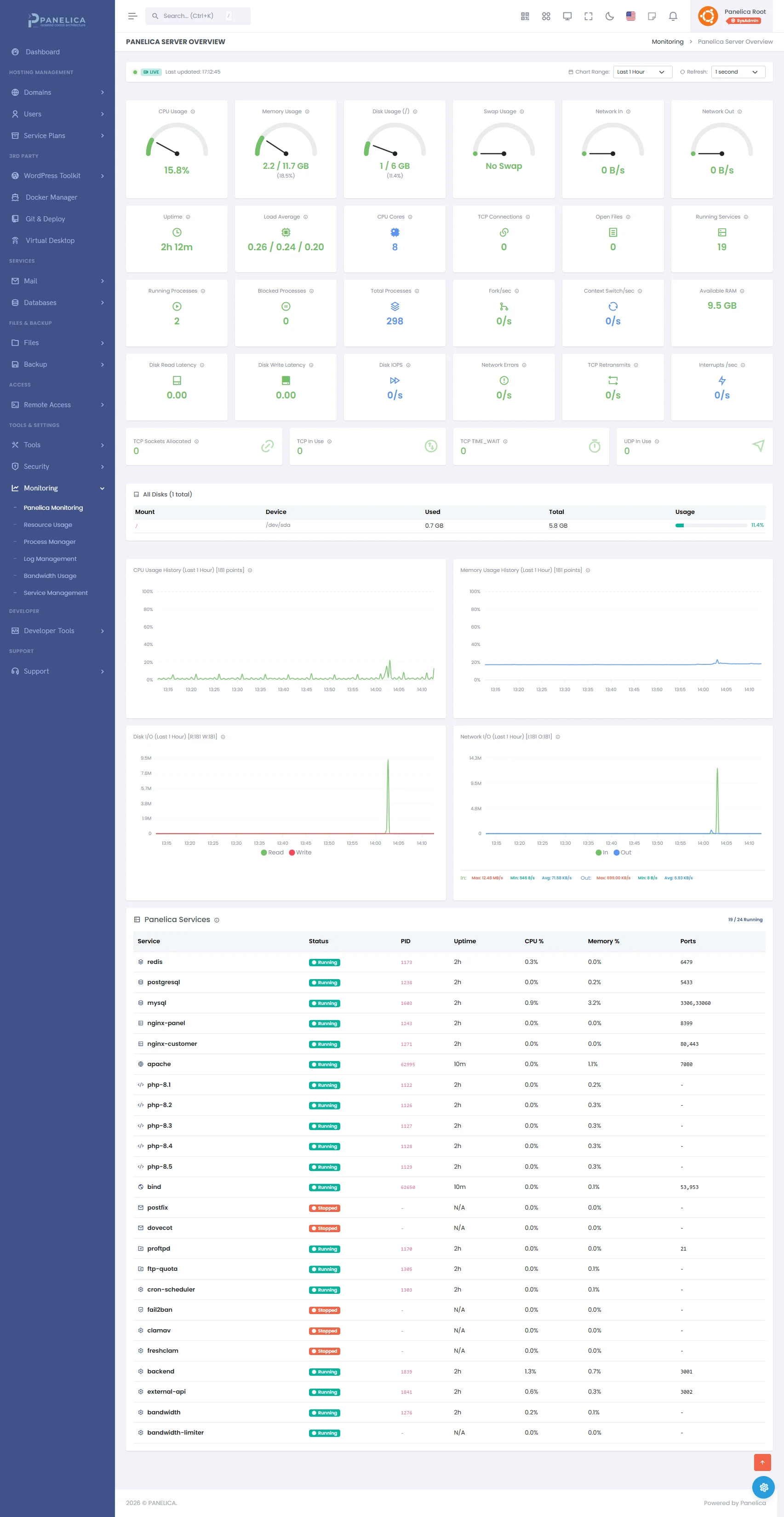
Panelica Monitoring — Real-time server metrics and performance tracking
Installation Speed
Traditional panel installations are measured in tens of minutes. Compiling packages, downloading repositories, running configuration scripts — a typical cPanel installation takes 45-60 minutes. Plesk is faster but still requires 15-20 minutes of package installation and configuration.
Panelica installs differently. Because the backend is a pre-compiled binary and all services are bundled, installation is primarily an extraction and configuration process:
| Server Type | Installation Time |
|---|---|
| Dedicated server (quality hardware, fast network) | 1 minute 36 seconds |
| Standard VPS (shared resources) | ~5 minutes |
| Minimal VPS (1 GB RAM) | ~7 minutes |
That is not a typo. On a dedicated server with reasonable I/O performance, Panelica goes from a bare Ubuntu installation to a fully operational panel with 20+ services running in under two minutes. The 27-step automated installer handles everything: service extraction, database initialization, SSL certificate generation, firewall configuration, and initial system hardening.
Minimum System Requirements
One of the advantages of a compiled Go backend is drastically lower resource requirements. While traditional panels recommend 2-4 GB of RAM as a minimum, Panelica is designed to run on significantly more modest hardware:
| Resource | Minimum | Recommended |
|---|---|---|
| CPU | 1 core | 2+ cores |
| RAM | 1 GB | 2+ GB |
| Disk | 20 GB | 40+ GB |
| OS | Ubuntu 22.04 / 24.04, Debian 12 / 13 | |
On a 1 GB, single-core VPS, Panelica will start, run, and serve your sites. It will not be fast under heavy concurrent load — no panel would be on those specs — but it will function reliably. This makes Panelica accessible for personal projects, development servers, small business sites, and environments where every megabyte of RAM translates directly to monthly hosting cost.
Intelligent Service Management
Running on minimal hardware is not just about having a lightweight binary. It is about being smart with what runs in the background. Panelica includes automatic service optimization that adapts to your actual usage:
- Unused services stay off. If you are not using email, Postfix and Dovecot do not start at boot. If you do not need FTP, ProFTPD stays dormant. The panel detects which services are actually configured and only starts what is needed.
- Built-in antivirus with smart scheduling. ClamAV runs with automatic freshclam updates, but scans are scheduled during low-usage periods to avoid impacting your sites during peak traffic.
- Connection pooling. Database connections are pooled and reused, not opened and closed per request. PostgreSQL maintains a pool of 25 idle connections that can burst to 100 under load, then contracts back when demand subsides.
- Graceful degradation. On low-memory systems, the backend automatically adjusts its internal caching, goroutine limits, and background task frequency to stay within available resources.
One Binary vs. Thousands of Files
A default cPanel installation creates over 350,000 files across the system. Plesk is more restrained but still distributes itself across thousands of PHP files, Perl modules, configuration fragments, and script directories. Every file is a potential attack surface. Every script is a potential injection point. Every include path is a dependency that must be maintained, updated, and secured.
Panelica's backend is a single binary file. 184 MB. One file. It contains the API server, the WebSocket handler, the job scheduler, the migration engine, the service manager, the backup system, and every other backend capability — compiled into machine code, statically linked, and cryptographically verifiable.
| Metric | Traditional Panel | Panelica |
|---|---|---|
| Backend files | 10,000-350,000+ | 1 (single binary) |
| Runtime dependencies | PHP/Perl + extensions + libraries | None (statically compiled) |
| Script parsing per request | Yes (every request) | No (compiled machine code) |
| Process spawning | Per-request or per-worker | Goroutines (microsecond startup) |
| Frontend architecture | Server-rendered HTML (full reload) | React SPA (instant navigation) |
| Update mechanism | Package manager + repo sync | Single binary replacement |
Updating Panelica is replacing one file. Not running package managers, not resolving dependency conflicts, not hoping that a Perl module update does not break a PHP extension. One file. The old binary is backed up, the new one takes its place, the service restarts in under 3 seconds.
Why Go? The Language Behind the Performance
Panelica's backend is written in Go — the language created at Google specifically for building scalable infrastructure software. This is not an incidental choice. Go was designed for exactly this kind of workload: high-concurrency network services that need to be fast, reliable, and maintainable at scale.
The companies that trust Go for their most critical infrastructure tell the story:
- Google — created Go and uses it across their cloud infrastructure, including parts of Google Cloud Platform
- Docker — the entire Docker engine is written in Go
- Kubernetes — the world's most popular container orchestrator, written entirely in Go
- Cloudflare — handles over 20% of global internet traffic using Go-based services
- Uber — processes millions of rides per day through Go microservices
- Netflix — uses Go for critical infrastructure components serving 200+ million subscribers
- Dropbox — migrated core infrastructure from Python to Go for performance
- Twitch — serves millions of concurrent video streams through Go services
Go's goroutine model is particularly relevant for a server management panel. When Panelica handles a WebSocket terminal session, monitors service health, processes a backup job, and serves API requests simultaneously — each task runs in its own goroutine. Goroutines are not operating system threads; they are lightweight cooperative processes managed by Go's runtime scheduler. Starting a goroutine costs approximately 2 kilobytes of memory and takes microseconds. Starting a PHP process costs megabytes and takes milliseconds.
This is why a single Panelica binary can serve 1,263 API endpoints, manage 21 services, run scheduled tasks, handle real-time WebSocket connections, and process background jobs — all within 227 MB of RAM. The language was built for this.
Frontend: A Panel That Feels Like a Desktop App
The performance story does not end at the backend. Panelica's frontend is built with React 19 — the same framework that powers Facebook, Instagram, Netflix, and Airbnb. But the choice of React is not about following trends. It is about what it enables:
- Zero page reloads. Navigate between domains, settings, monitoring dashboards, file managers, and Docker containers without a single page reload. The interface loads once and stays loaded.
- Instant state updates. When you create a domain, the list updates immediately. When a backup completes, the status changes in real time. No polling. No manual refresh.
- Optimistic UI. Actions feel instant because the interface updates before the server confirms. If something fails, it rolls back gracefully. The result is a panel that feels responsive even over high-latency connections.
- Code splitting. Only the code for the current view is loaded. The Docker manager does not load until you visit it. The file manager stays dormant until needed. Initial page load transfers only what is necessary.
- 42 theme presets. Switch between themes (Panelica, Ubuntu, Binance, GitHub, Dracula, Nord, and 36 more) instantly — no page reload, no server request. Dark mode and light mode toggle in real time.
The combined JS and CSS payload for the entire panel is 19 MB — but with code splitting, the initial load is a fraction of that. Subsequent navigation is essentially free.
The Codebase: 585,000 Lines of Purpose
Numbers like "585,000 lines of code" can feel abstract, so here is what that translates to in practice:
| Component | Lines | What It Covers |
|---|---|---|
| Go Backend | 306,000+ | 1,263 API endpoints, 109 handlers, 53 service packages, 91 models, 5-layer isolation, migration engine, backup system, Docker orchestration, email management, DNS, SSL automation |
| React Frontend | 278,000+ | Every interface view, 42 theme presets, real-time WebSocket terminals, file manager, Docker UI, monitoring dashboards, 32 language localizations |
| Database Schema | 266 migrations | 145+ tables covering users, domains, DNS, email, FTP, SSH, Docker, backups, security, audit logs, RBAC, quotas, and more |
Every line was written for this project. There is no forked codebase, no legacy module adapted from another panel, no third-party panel framework underneath. Panelica is built from scratch — and that shows in the architectural coherence, the consistent API design, and the performance characteristics that come from a codebase designed as a single system rather than assembled from parts.
What This Means for Your Budget
Performance is not just about speed. It is about money.
A panel that runs comfortably on 1 GB of RAM means you can host it on a $5/month VPS. A panel that requires 4 GB minimum means your cheapest option starts at $20/month. Over a year, that is the difference between $60 and $240 — before you even count the add-on costs for features that Panelica includes by default.
A panel that installs in under 2 minutes means less downtime during provisioning. A panel that updates by replacing a single binary means less risk during maintenance windows. A panel that manages services intelligently — starting only what you use, stopping what you do not — means more of your server's resources go toward serving your actual customers.
Infrastructure efficiency is not a technical abstraction. It is a line item on your hosting bill.
Conclusion
The server management industry has operated on the assumption that panels must be heavyweight, resource-hungry, and architecturally complex. That assumption was reasonable when the only option was interpreted scripting languages and server-rendered HTML.
It is no longer reasonable.
A single Go binary can serve 1,263 API endpoints in 227 MB of RAM. A React frontend can eliminate every page reload you have ever endured. An intelligent service manager can ensure your server runs only what it needs. And a five-layer isolation architecture can protect every account without consuming the resources that older security models demand.
These are not promises. They are measurements from production servers running right now.
If your current panel makes you wait, makes your server work harder than it should, or charges you for resources it wastes on its own overhead — the alternative is not another panel built the same way. It is a platform built the way infrastructure software should have always been built.
Explore Panelica and see what your server is capable of when the panel stops getting in the way.
Thinking about switching from legacy panels?
See how Panelica compares feature-by-feature, including real 2026 pricing and migration steps.
See the full comparison