DirectAdmin has been around since 2003. For a long time, that stability was a feature. You knew what you were getting: a reliable, no-nonsense panel that did the basics without drama. Shared hosting, DNS, email, FTP — it all worked.
But 2026 is not 2003. Your servers now run Docker containers, your teams expect AI-powered assistance, your clients demand true multi-tenant isolation, and your workflow depends on Cloudflare being part of the stack — not a manual afterthought. DirectAdmin has tried to keep up, but a 23-year-old architecture has limits. Some of those limits are now costing you time, security, and money.
This post breaks down exactly where DirectAdmin falls short in 2026, how it compares to Panelica feature-for-feature, and why more and more hosting professionals are switching.
See also: The Best cPanel and Plesk Alternative in 2026 | Top 10 Best Server Management Panels in 2026
What Is DirectAdmin?
DirectAdmin is a commercial web hosting control panel developed by JBMC Software, first released in 2003. It runs on Linux and is typically used by shared hosting providers. Over the years it picked up a loyal following thanks to its relatively low price (around $2/month per server on some license tiers), lightweight footprint, and functional — if dated — interface.
Version 2.0 introduced a new React-based UI called Evolution, which modernized the look considerably. The underlying engine was also partially rewritten in C++ to improve performance. These were meaningful improvements. But structural decisions made in the early 2000s still constrain what DirectAdmin can offer today.
If you are running a straightforward shared hosting operation with no Docker, no cloud integrations, and no demand for modern isolation, DirectAdmin still does the job. But if your requirements have grown past that baseline, you will start hitting walls.
Where DirectAdmin Falls Short in 2026
No Docker Support
DirectAdmin has no native Docker integration. There is no container management, no Docker Compose support, no image registry browser, and no per-container resource controls. If you want to run containerized applications alongside your hosting stack, you are doing it entirely outside DirectAdmin — in a separate tool, managed manually via CLI, with no unified view.
For a modern hosting panel this is not a minor gap. Docker is how teams deploy applications in 2026. Web agencies run staging environments in containers. Developers need app templates they can spin up in one click. None of that is available in DirectAdmin.
No AI Integration
DirectAdmin does not include an AI assistant of any kind. Server troubleshooting, log analysis, configuration advice — all of that falls entirely on the administrator. As AI-powered tooling becomes standard across the industry, panels that don't integrate it are forcing their users to context-switch constantly.
Limited User Isolation
DirectAdmin's user isolation relies primarily on Unix permissions and basic PHP-FPM pools. It does not implement cgroups v2 for CPU and memory enforcement, does not use Linux namespaces to separate process trees, and does not provide SSH chroot jails as a native feature. Per-version PHP-FPM isolation across multiple PHP versions per user is not available.
What this means in practice: a single noisy or compromised user can affect other users on the same server. Without cgroup limits, one user running a memory-intensive process can degrade performance for everyone. Without namespace isolation, users in theory can observe each other's process trees. These are not theoretical concerns — they are documented attack vectors in shared hosting environments.
No Cloudflare Integration
DirectAdmin does not have built-in Cloudflare integration. Syncing DNS records to Cloudflare, managing Cloudflare zones, or automating email DNS (DKIM, SPF, DMARC) through Cloudflare requires manual work or third-party tooling. For hosting providers managing dozens or hundreds of domains, this is a significant operational overhead.
No Built-in WordPress Toolkit
WordPress management in DirectAdmin is basic. There is no built-in one-click installer with plugin and theme management, no automatic update system, no security hardening automation, and no staging environment support. You need a third-party plugin or a separate tool like Softaculous — which adds cost, complexity, and another update surface.
Basic Email Management
Email works in DirectAdmin, but DKIM, SPF, and DMARC are not automatically configured when you create a domain. Email DNS is a manual step. In 2026, with Gmail and other providers enforcing strict authentication requirements, this means domains on DirectAdmin servers often have deliverability problems out of the box that require manual intervention to fix.
Limited Backup Architecture
DirectAdmin's backup system covers the basics but lacks incremental backups, BTRFS snapshots, and native remote backup destinations (S3, Google Drive, SFTP, OneDrive). Backup scheduling is straightforward but not granular. For hosting businesses where data protection is a liability concern, this is a gap.
Migration Tools Are Narrow
DirectAdmin's migration tools are primarily designed for DirectAdmin-to-DirectAdmin transfers. If you are moving clients from cPanel, Plesk, CyberPanel, HestiaCP, or another panel, you are largely on your own — scripting manual transfers, dealing with database credential mismatches, and reconstructing email and DNS configurations by hand.
DirectAdmin vs Panelica: Feature Comparison
| Feature | DirectAdmin | Panelica |
|---|---|---|
| Architecture | C++ (2003, partially rewritten) | Go 1.24 + React 19 (built from scratch, 2024) |
| Docker Management | No | Yes — containers, images, Compose, 20+ app templates |
| AI Assistant (OpsAI) | No | Yes — server diagnostics, log analysis, config advice |
| Cgroups v2 per user | No | Yes — CPU, memory, I/O, process limits enforced |
| Linux Namespace isolation | No | Yes — PID + Mount namespaces, CageFS-style rootfs |
| SSH Chroot Jails | No | Yes — SFTP-only or bash+chroot, native |
| PHP-FPM per-user per-version | Partial — per-user only | Yes — per-user, per-version pools (PHP 5.6 → 8.5, native + Docker shim) |
| Multi-PHP versions | Yes | Yes — PHP 5.6, 7.0–7.4, 8.1–8.5 |
| Cloudflare Integration | No | Yes — multi-account, zone sync, mail DNS automation |
| WordPress Toolkit | No (3rd party required) | Yes — one-click install, plugin/theme mgmt, staging, Boost |
| Email DKIM/SPF/DMARC auto-config | No | Yes — automatic on domain creation |
| Built-in DNS (BIND) | Yes | Yes |
| Let's Encrypt SSL (auto-renewal) | Yes | Yes — wildcard support included |
| ModSecurity + OWASP CRS | Limited | Yes — built-in, per-domain toggle |
| Fail2ban integration | Yes | Yes |
| nftables Firewall | No | Yes — managed from the panel UI |
| Incremental Backups | No | Yes |
| BTRFS Snapshots | No | Yes |
| Remote Backup (S3/GDrive/SFTP/OneDrive) | No | Yes — all four |
| RBAC (multi-level) | Admin / Reseller / User | Root / Admin / Reseller / User — granular page-level permissions |
| Migration from other panels | DA to DA only | cPanel, Plesk, DirectAdmin, CyberPanel, HestiaCP, Panelica |
| Real-time resource monitoring | Basic | Yes — per-user, Prometheus + Grafana built-in |
| API (REST, external, webhooks) | Yes (limited) | Yes — 1,263 endpoints, HMAC-SHA256 external API, webhooks (HTTP/Telegram/Slack/Discord) |
| Mobile App | No | Yes — QR connect, monitoring, domain/backup management |
| UI themes | Limited | 42 color presets, dark and light mode |
| Supported languages | Limited | 30 languages, full translation parity |
| Installation time | Variable | Under 3 minutes — 20 services configured automatically |
What Makes Panelica Different
5-Layer Security Isolation
Security isolation in Panelica is not a premium add-on. Every user on every plan gets all five layers by default.
Layer 1 — Cgroups v2: Each user gets a dedicated cgroup slice with enforced limits on CPU, memory, disk I/O, and process count. A user who exhausts their memory allocation gets killed by the kernel — not allowed to degrade other users on the same server.
Layer 2 — Linux Namespaces: PID and mount namespaces create a CageFS-style isolated rootfs per user. Users cannot see each other's process trees or file systems.
Layer 3 — SSH Chroot Jails: Native SSH isolation without third-party tools. SFTP-only mode locks users to their home directory. Full bash mode with chroot prevents access to the broader filesystem.
Layer 4 — PHP-FPM Per-User Per-Version Pools: Each user gets a dedicated PHP-FPM pool for each PHP version they use. open_basedir and disable_functions are enforced per pool. A compromised PHP process cannot read another user's files.
Layer 5 — Unix Permissions: Dedicated UID/GID per user, home directories set to 700, file ownership enforced at write time.
For a deeper look at the architecture, see: Zero-Trust Hosting: 5-Layer Isolation Architecture
Docker Manager with App Templates
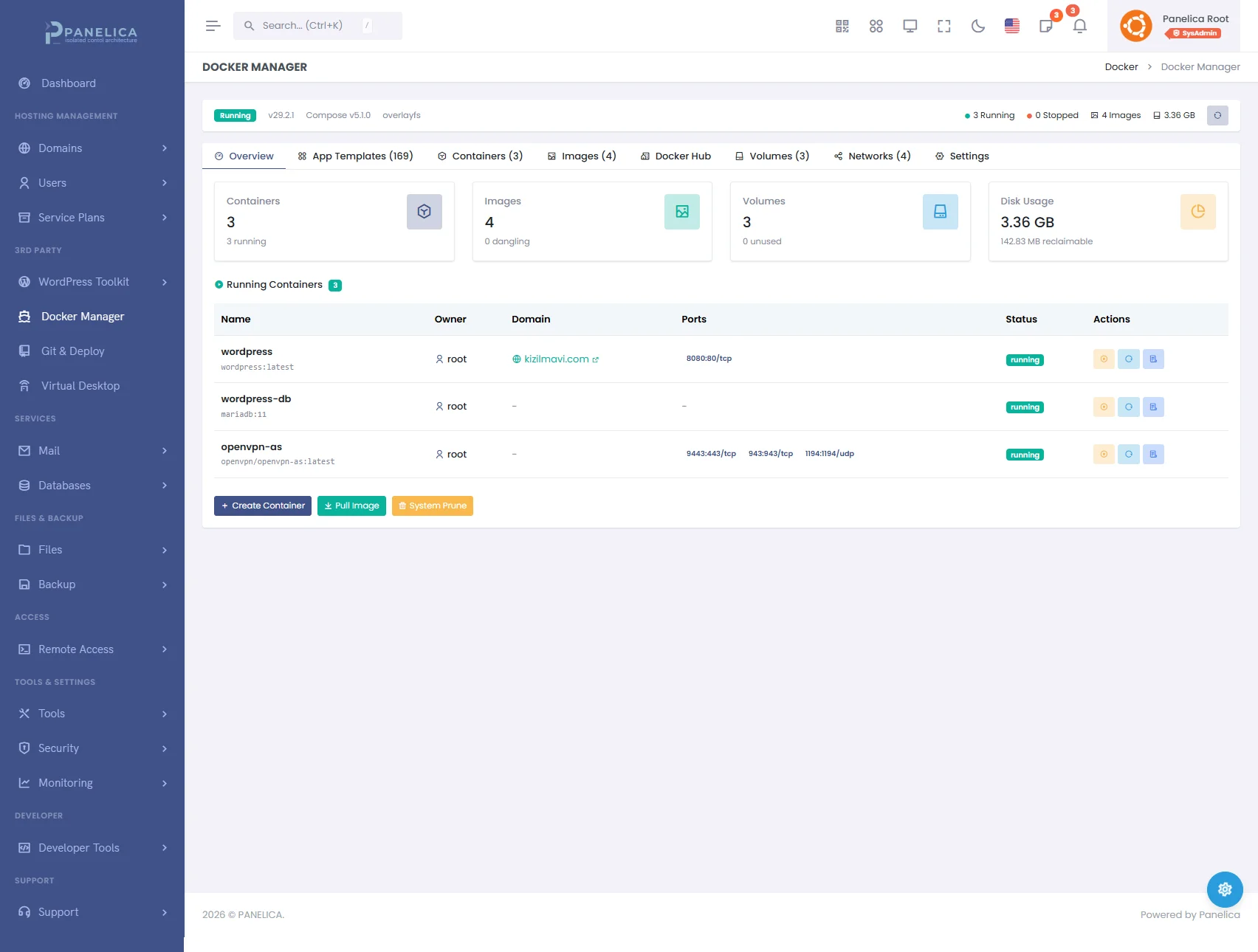
Panelica Docker Manager — Deploy and manage containers without leaving your panel
Panelica includes a full Docker management interface. You can create and manage containers, pull images, write and deploy Docker Compose stacks, and use 20+ built-in app templates for common workloads — Node.js, Python, Redis, MongoDB, and more — without touching the CLI.
Each container runs inside the user's cgroup slice, so resource isolation extends to Docker workloads as well. A container that consumes too much CPU or memory is constrained by the same limits that apply to the rest of the user's processes.
OpsAI — Optional AI-Powered Server Assistant (Opt-In)
Panelica includes OpsAI — optional AI assistant (opt-in) — built directly into the panel's toolset. It can diagnose server issues, interpret log files, suggest configuration changes, explain error messages, and help with routine tasks — all from within the panel UI. You do not need to copy-paste logs into a separate chat window or switch context to get answers.
Cloudflare Deep Integration
Connect multiple Cloudflare accounts to Panelica. When you create a domain, Panelica can automatically sync DNS records to Cloudflare, including full mail DNS — MX, SPF, DKIM, and DMARC — configured correctly on the first try. No manual DNS editing required.
Built-in Email That Actually Works
Panelica ships with Postfix, Dovecot, and Roundcube. When you create a new domain and enable email, DKIM, SPF, and DMARC records are configured automatically. This is not a convenience feature — it is the difference between email that lands in the inbox and email that lands in spam. Gmail's 2025 enforcement requirements (mandatory SPF, DKIM, and DMARC alignment for bulk senders) make this essential.
WordPress Toolkit + Boost
Install WordPress with one click. Manage plugins and themes from the panel. Set up automatic core, plugin, and theme updates. Apply security hardening — remove xmlrpc.php, disable directory listing, enforce strong passwords — with a single toggle. Create staging environments for client review before pushing changes live. Enable WordPress Boost to add Redis object caching with no configuration required.
Migrating from DirectAdmin to Panelica
Panelica includes a built-in migration pipeline with a DirectAdmin adapter. The process works as follows:
- Connect to the source DirectAdmin server (SSH credentials or API)
- Panelica discovers all users, domains, databases, and email accounts
- Select what to migrate — all users, specific users, or specific domains
- Panelica creates the users and domains on the destination server
- Files are transferred via rsync with real-time progress reporting
- Databases are imported with MySQL password hash preservation — users keep their existing database passwords
- Email accounts, forwarders, and autoresponders are migrated
- SSL certificates are reissued via Let's Encrypt on the new server
- DNS records are updated automatically if Cloudflare is connected
The migration runs in the background. You can monitor progress from the panel UI and receive a report when it completes. For large migrations — hundreds of domains — Panelica supports checkpoint-based recovery, so a failed transfer resumes from where it stopped rather than starting over.
WordPress configuration files (wp-config.php, .env files) are transferred unchanged. Database connection strings, salts, and site URLs are preserved. The site works on the new server without manual edits to configuration files in most cases.
Performance and Architecture
Panelica's backend is written in Go 1.24 — a compiled, statically typed language with native concurrency. Approximately 215,000 lines of Go handle all panel operations. The frontend is React 19 with TypeScript, built with Vite, and served as a compiled static bundle. There is no PHP execution on the panel backend itself.
Compared to panels with PHP or Python backends, this translates to lower memory usage, faster response times under concurrent load, and no PHP-FPM tuning required for the panel itself. For a detailed look at the numbers, see: Panelica Performance Benchmark 2026
The entire panel stack — 20 services including PostgreSQL 17, MySQL 8, Redis 7, BIND 9, Postfix, Dovecot, Prometheus, Grafana, and more — lives under /opt/panelica/. There are no system-wide configuration file modifications. Moving the panel to a new server is a filesystem copy plus a configuration file edit.
Conclusion
DirectAdmin is not a bad panel. For straightforward shared hosting with no containerization requirements, no AI tooling expectations, and no need for deep Cloudflare integration, it still works. But "it still works" is not the same as "it is the right choice for 2026."
If you are running Docker alongside your hosting stack, managing clients who need true process isolation, dealing with email deliverability problems caused by missing DKIM/SPF/DMARC setup, or trying to migrate clients from other panels without a week of manual work — DirectAdmin is holding you back.
Panelica was built from scratch to handle all of it: 5-layer isolation by default, Docker management built in, an optional OpsAI assistant, Cloudflare integration, one-click WordPress management with Redis caching, automatic email DNS, and a migration pipeline that handles cPanel, Plesk, DirectAdmin, CyberPanel, and HestiaCP.
Get Starter free — 3 domains forever, with a 14-day all-features bonus. No credit card required. The installation takes under 3 minutes.
Ready to switch? Install Panelica on Ubuntu 24.04 in under 3 minutes.
See also: The Best cPanel and Plesk Alternative in 2026 | Zero-Trust Hosting: 5-Layer Isolation Architecture | CyberPanel Alternative 2026: Nginx-Native Panels | Best Open Source Server Panel 2026 Comparison | cPanel vs Plesk vs Panelica: 2026 Comparison
Thinking about switching from DirectAdmin?
See how Panelica compares feature-by-feature, including real 2026 pricing and migration steps.
See the full comparison