Panelica multi-server management lets one Panelica panel — the master — list, monitor and manage other Panelica servers from a single window. You connect a server with a single-use link code, and from then on the master shows its live CPU, RAM and disk, lists the domains and mailboxes of every server in one table, opens the other server's pages without a second login, and can create new hosting accounts on whichever server has room. Every connected server stays a complete, independent Panelica installation: if the master goes offline, the sites on the other servers keep running. The feature ships with panelica-server 1.0.551 on the beta update channel.
The Problem With Five Browser Tabs
Most hosting operations outgrow one server sooner or later. A second VPS for a large client, a third in another region, a fourth because the first one is full. Each server has its own panel, its own login, its own list of domains, and the answer to "which server is shop.example.com on?" is a spreadsheet or a memory. Creating a new customer means first deciding where there is space, then logging in there.
Panelica's approach is deliberately simple: every server keeps running its own full panel, and one of them can act as a remote control for the others. There is no shared database, no cluster to keep in sync and no single point of failure for the websites themselves.
How Pairing Works
Pairing starts on the server you want to manage — called a node here — because that server decides who may control it.
panelica node link-code on its command line. The code works once, for 15 minutes.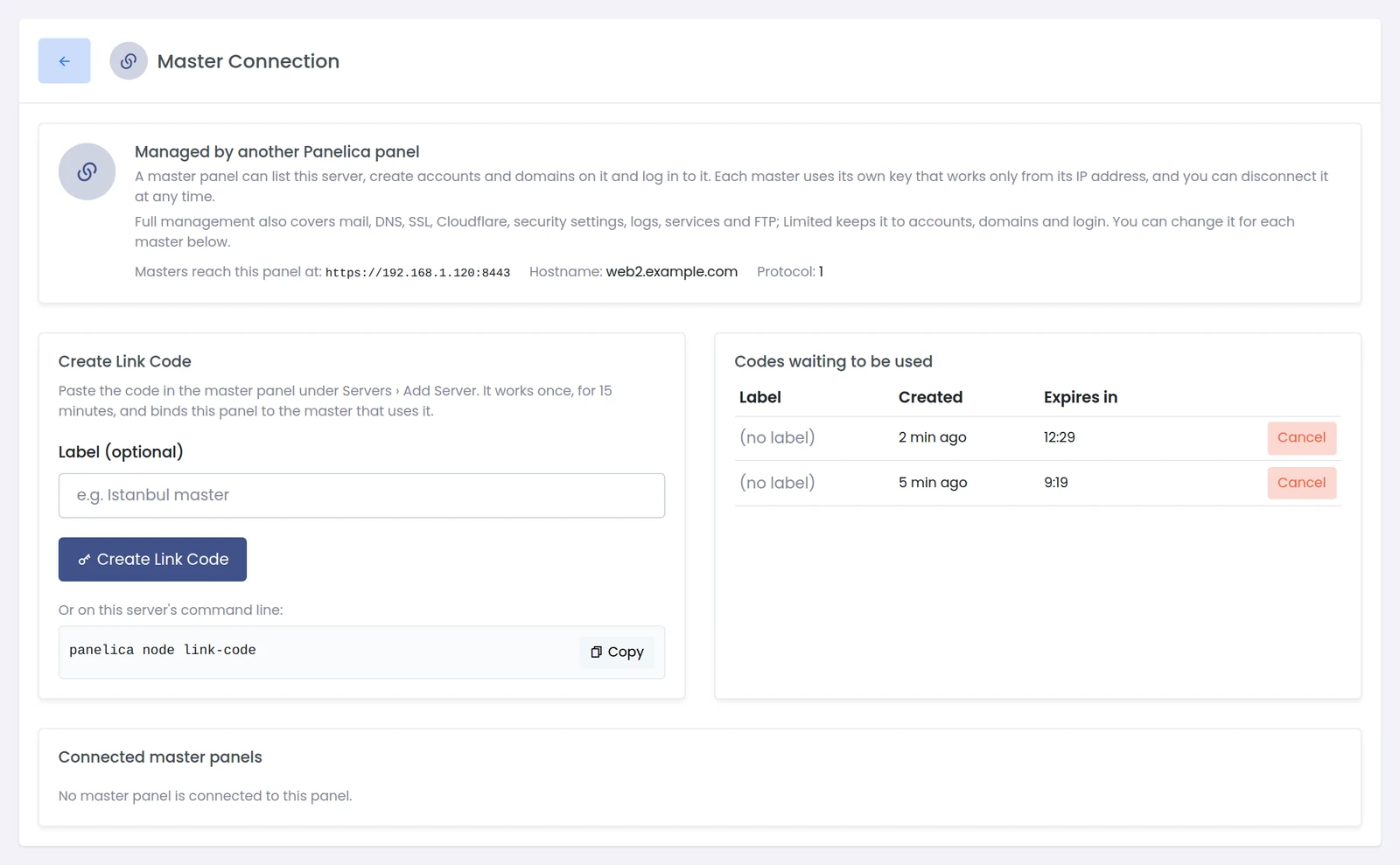
On the node: Panel Settings › Master Connection. Create a link code here, or with panelica node link-code.
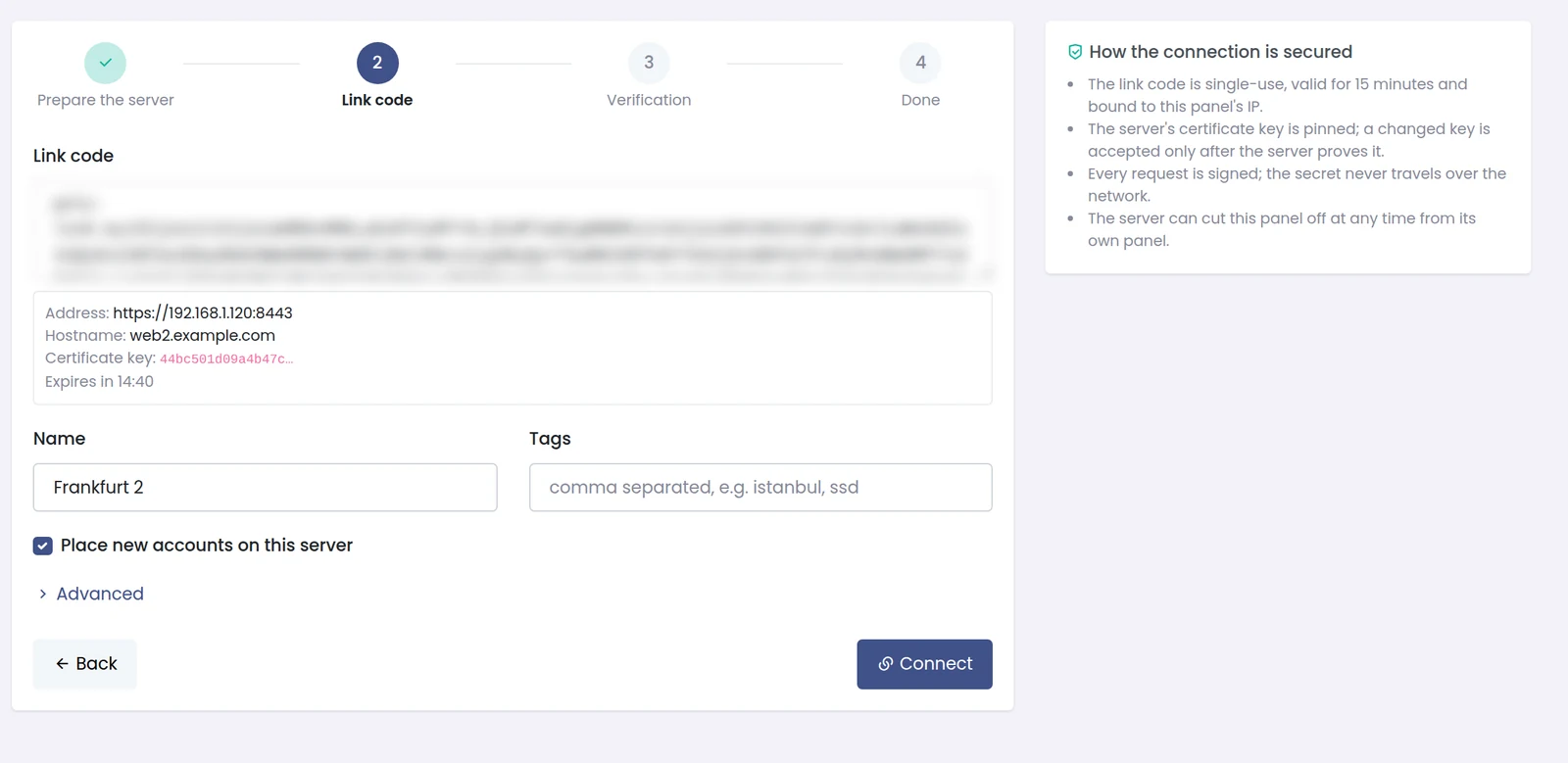
On the master: Servers › Add Server. The code is blurred here; it carries the node's address, hostname and certificate key.
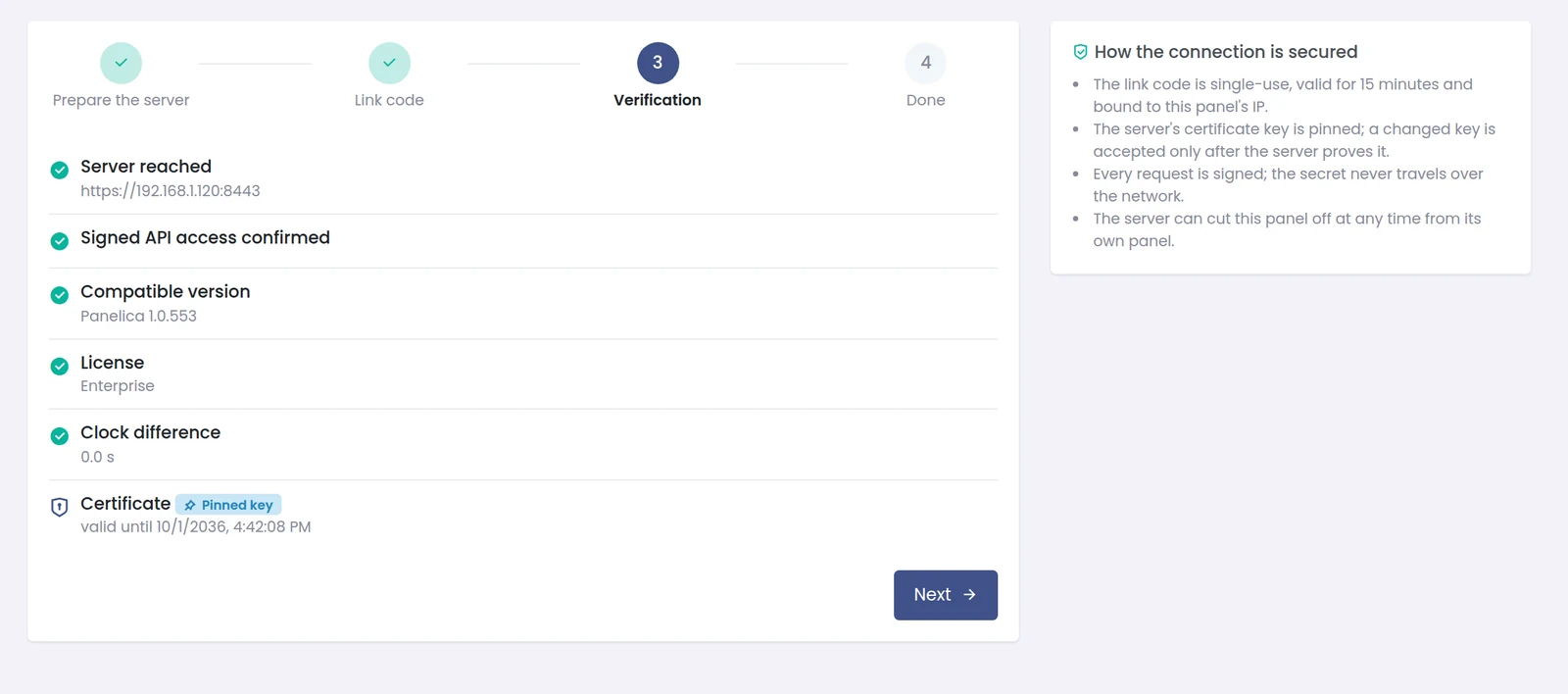
The verification step. Every check has to pass before the server is added.
What Keeps the Connection Safe
A master panel can create accounts on another server and log in to it, so the link between them is treated as a credential, not as a convenience:
- Single-use, short-lived codes — a link code works once, expires after 15 minutes, and binds the node to the master that used it.
- Pinned certificate key — the master remembers the node's certificate key. If the key changes, for example after a certificate renewal, the new key is accepted only after the server proves it.
- Signed requests — every request is signed with a key that never travels over the network after pairing, and each master's key only works from that master's IP address.
- Full or Limited access — the node chooses per master. Full management covers mail, DNS, SSL, Cloudflare, security settings, logs, services and FTP; Limited keeps the master to accounts, domains and login.
- The node can disconnect at any time — from its own Master Connection page, without asking the master.
The Servers Page
Servers lists every connected server with its status (online, in maintenance, or not responding with the reason), Panelica version, CPU, RAM, disk, network traffic, number of accounts and the time of its last answer. The values are live. Refresh all polls every server at once.

The Servers list: status, version and live resources for each connected server.
The eye button hides host names and IP addresses and shortens each server name to its first and last character, which is useful when you share your screen or record a video for a client.

The same list with names hidden: only the first and last character of the name stay visible.
Managing Another Server Without Leaving the Master
Opening a server shows its live resources, connection details, the pinned certificate, its license and system, and a grid of the pages you can open for it: domains, mail, DNS, SSL, firewall, Fail2ban, ModSecurity, antivirus, the Security Advisor, terminal, SSH, files, services, logs and updates. Those pages open right there, inside the master's window — you do not log in to the other panel separately. Which of them appear depends on whether the node granted Full or Limited access.
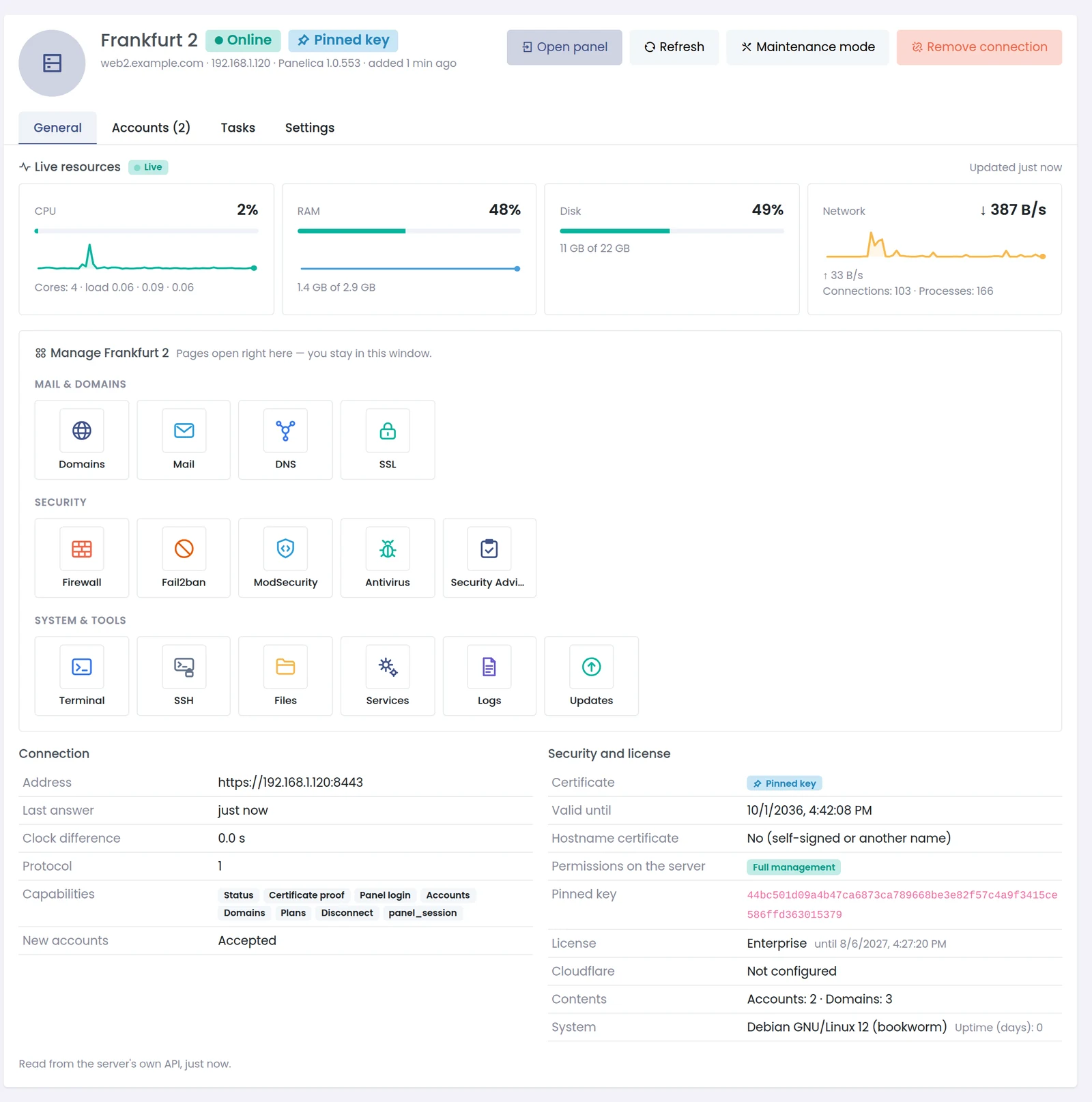
A connected server on the master: live resources, the pages you can open for it, and the connection details read from the server's own API.
The same works from any page through the server switcher in the page title: pick a server the node gave Full management to, and the page you are on switches to that server in the same window; for a Limited connection it opens the server's details instead. Open panel logs you in to the server's own panel in a new tab when you need it, and Maintenance mode stops new accounts from being placed on a server without touching the existing ones.
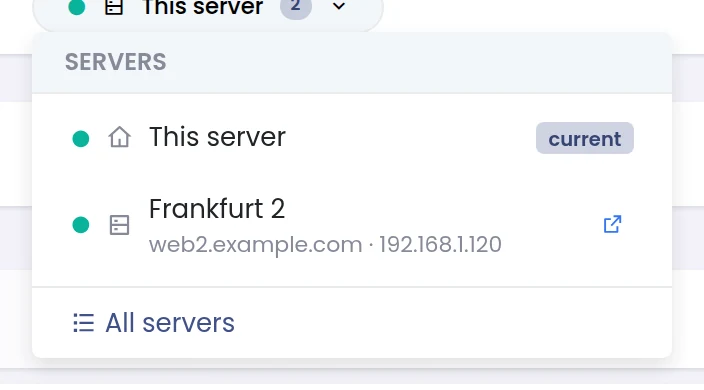
The server switcher in the page title.
Domains and Mailboxes Across All Servers
Two fleet views answer the most common question — where is it? — without opening each server: Domains on every server and Email accounts on every server. Each row carries a badge with the server it lives on, a filter narrows the list to one server, and Manage opens the domain or mailbox on its own server.
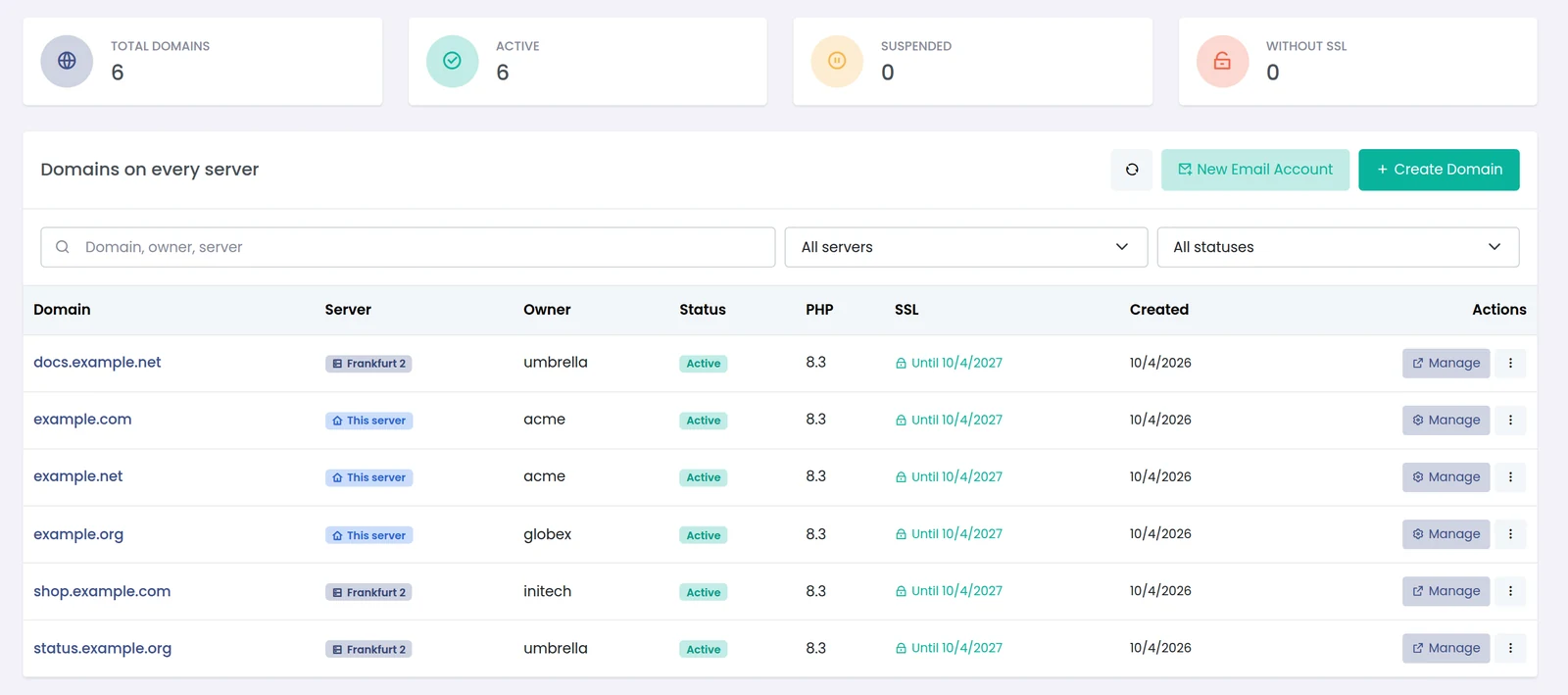
Domains on every server: the server badge shows where each site lives.
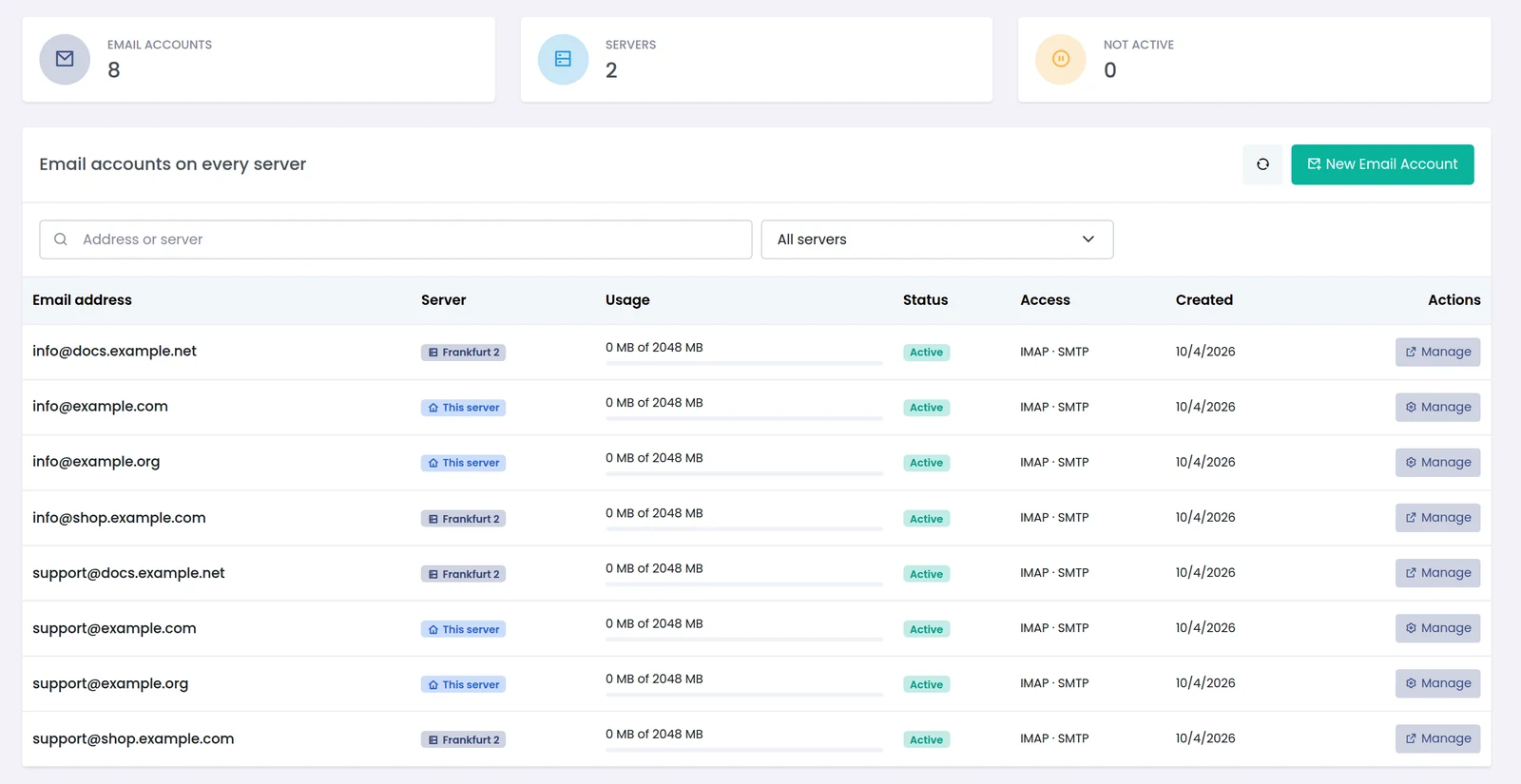
Email accounts on every server, with usage and status.
Choosing Where a New Account Goes
When a master creates a hosting account, the form asks which server it should be created on: this server, a specific connected server, or Automatic. Automatic skips connected servers that are in maintenance, do not accept new accounts, are not answering or are above their disk threshold, and picks the one with the most room left by disk and RAM usage, then by number of accounts. CPU is left out on purpose: it changes from second to second and would make the choice random. Each candidate shows its disk and RAM usage and its account count, so the choice is made with numbers on screen.
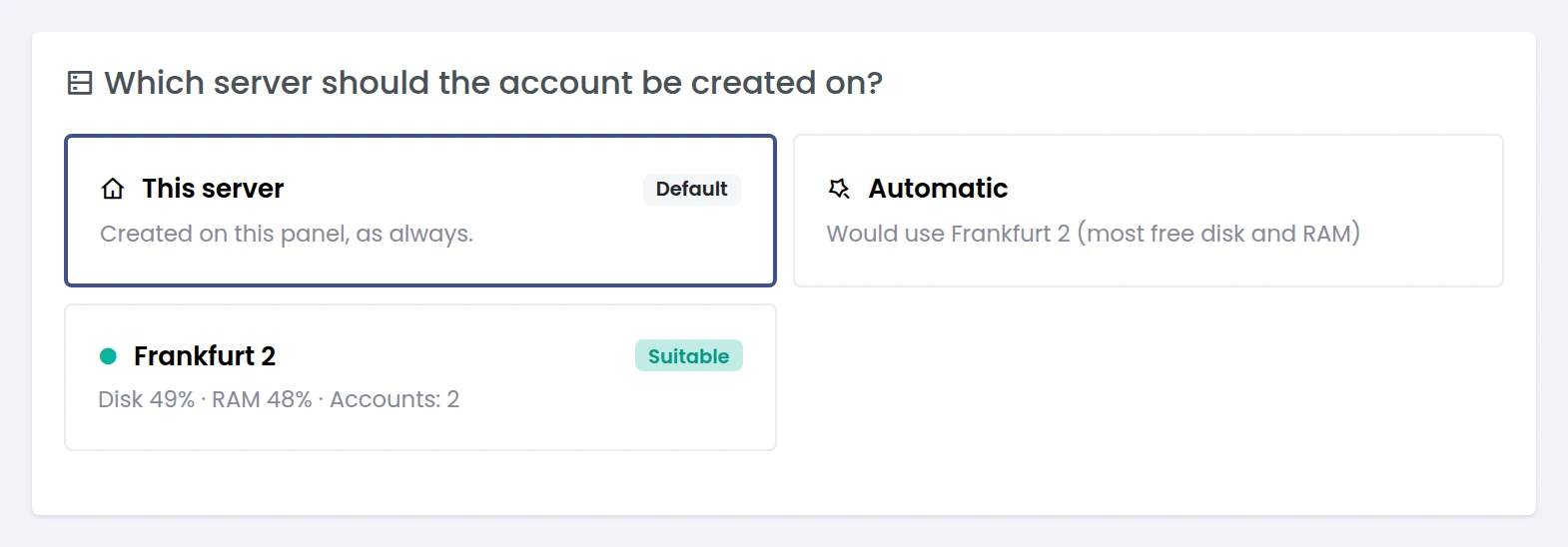
Account placement on the master: this server by default, a specific server, or automatic.
Licensing and Requirements
| Role | What it needs |
|---|---|
| Master panel | An Enterprise license (the multi-server module) |
| Connected server (node) | A paid Panelica license that includes server linking, and a version that supports the node protocol |
| Network | The master must reach the node's panel address over HTTPS |
The Servers menu can be hidden from the theme customiser's menu sections if you do not use it.
Frequently Asked Questions
What happens to the websites if the master panel goes down?
Nothing. Each connected server is a complete Panelica installation that serves its own sites, mail and DNS. The master only sends commands and reads status.
Can one server be managed by two masters?
Yes. Each master gets its own key and its own Full or Limited permission, and the node can disconnect each one separately.
Does the master store the other server's root password?
No. Pairing uses a single-use link code; after that, every request is signed with a key that never travels over the network. No SSH access is used.
What if the node's SSL certificate changes?
The master has the old certificate key pinned. A new key is accepted only after the node proves it through the signed connection, so a renewed certificate does not break the link, and an unexpected one is not trusted.
Can I see which server a customer's domain is on?
Yes. Domains on every server shows a server badge on each row and can be filtered by server.
Is the connection encrypted?
Yes. The master talks to the node's panel address over HTTPS with the node's certificate key pinned, and signs every request.