The latest Panelica release adds VPS Manager, moving a domain to another account, and a low-resource mode for backups, along with a long list of improvements across SSL, Docker sites, mail and security. VPS Manager runs full Linux servers next to your websites on the same machine. A domain can now move to another account with its files, databases, email accounts and settings in one guided step. Backups can be limited so they never take the whole disk away from your sites. Let's Encrypt renewals keep every subdomain on the certificate, Docker, Node.js and Python sites gain several long-requested options, and the domain page gets FTP, email alias and forwarder management of its own. These changes ship in panelica-server 1.0.562 to 1.0.564 and panel-frontend 4.5.363 to 4.5.365, translated into all 31 languages.
VPS Manager: Full Linux Servers Next to Your Sites
VPS Manager creates VPSs on the server that already runs Panelica: Ubuntu, Debian, AlmaLinux, Rocky Linux or Alpine, each with root access, its own users, services and cron, CPU, memory, disk and bandwidth limits, a private address with port forwards or a dedicated IP, a browser terminal, a serial console and a file manager. Tools inside a VPS such as free and htop show that VPS's own limits. A domain or subdomain can be sent to a port inside a VPS the way Docker containers are linked, with the certificate kept in the panel; the root administrator can link any domain, other roles the domains of the accounts they manage. VPS Manager is installed only when the root administrator clicks Install, and service plans gain VPS limits for hosting customers.
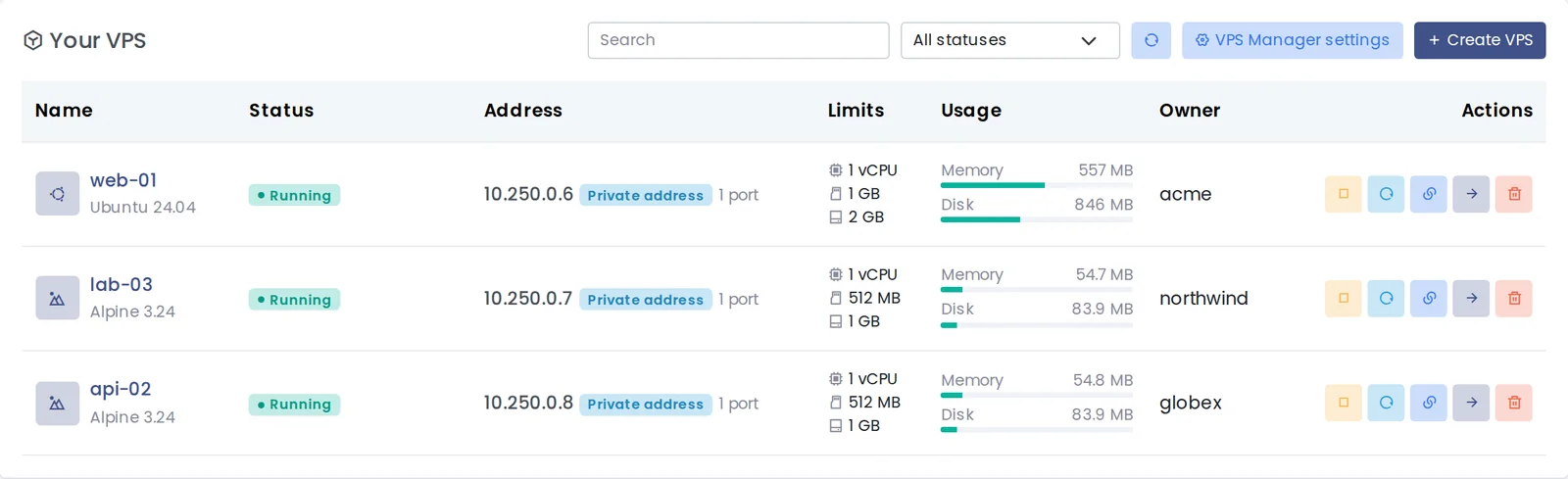
The VPS list with live use, owners and a Linked domains action on every row.
Full guide: Panelica VPS Manager: Run Full Linux Servers Next to Your Websites
Move a Domain to Another Account
The root administrator can move a domain to another account from the domain page. A wizard first checks everything and shows what will happen — including files that still refer to the old account — then moves the site with its files, databases, email accounts and settings, shows live progress and a final report, and rolls back if a step fails. You choose whether the site goes to the same person's other account (passwords stay as they are) or to someone else (you decide which passwords are renewed). During the move the site shows a maintenance page and incoming mail waits; both continue when the move ends. Domains that run Docker, Laravel, Node.js, Python or Git apps, or that are linked to a VPS, cannot be moved yet.
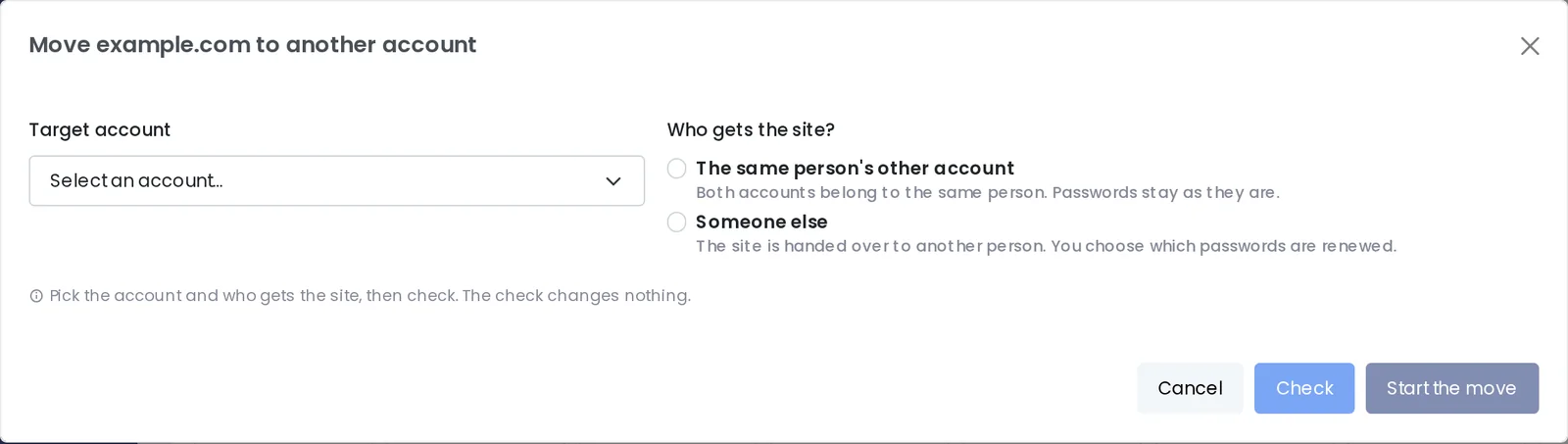
Moving a domain: choose the account and who gets the site, then check.
Backups That Leave Room for Your Sites
Low-resource mode limits how fast a backup may read and write the disk, so websites keep responding while it runs. Automatic measures the disk once and allows about half of its speed; Light, Balanced and High use about 20, 50 and 120 MB/s, and Custom takes any value. The limit applies to manual and scheduled, full and incremental backups. Servers that update keep it off, so backups run as fast as before until you choose a mode in Panel Settings › Backup; new installations start with Automatic.
Full guide: Backups That Don't Slow Down Your Websites: Low-Resource Mode
SSL: Renewals Keep Every Subdomain
Let's Encrypt issuing, renewing and reissuing now use one list of names, so a renewal keeps every subdomain that uses the domain's certificate, up to 100 names. A certificate with fewer names is never installed over a working one while the current certificate has more than 14 days left, and repeated requests for the same certificate are avoided. The panel waits up to 10 minutes for a certificate, so a slow but successful request is no longer reported as failed, and Reissue and Renew list the subdomains that are not on the certificate. The server's host name now answers on port 443 with the panel's certificate when that certificate covers it.
Docker, Node.js and Python Sites
- Visitor port — the app receives the visitor's source port in an
X-Real-Portheader, next toX-Real-IP. - Mail client auto-configuration — Thunderbird autoconfig and Outlook autodiscover can be answered by Panelica for app-served domains: automatically while the domain has an email account on the server, always, or never.
- Your own nginx directives — Domain › Web Server › Nginx takes directives for the server block and for inside
location /; if nginx refuses them, the site keeps working without them. - A branded page while the app is down — instead of nginx's default error page.
- Proxies stay proxies — reissuing SSL or changing the PHP version, web server or cache no longer replaces an app site's proxy with a PHP site, and sites affected before are restored automatically.
- Containers see their own resources — a container with a CPU limit sees only its own CPUs in
htop,top,getconfandlscpu, and compose services see their own CPU and memory. - Fixes — Node.js and Python sites obtain and renew Let's Encrypt certificates again; Docker stack backup and restore work end to end; a port that cannot be used says why.
The Domain Page Gets FTP, Aliases and Forwarders
A new FTP tab lists the FTP accounts that work in the domain's folder or its web folder, with the accounts that reach the whole hosting account listed apart. New accounts can be limited to the domain folder or the web folder, and the connection details show the server, the configured FTP port and passive mode. The Email tab gains an aliases button on every email account and a Forwarders card with catch-all support. The page also has a Redirects tab, tab names on one line, colored Quick Actions tiles and quick statistics that name the Docker container, app or VPS when one serves the site.
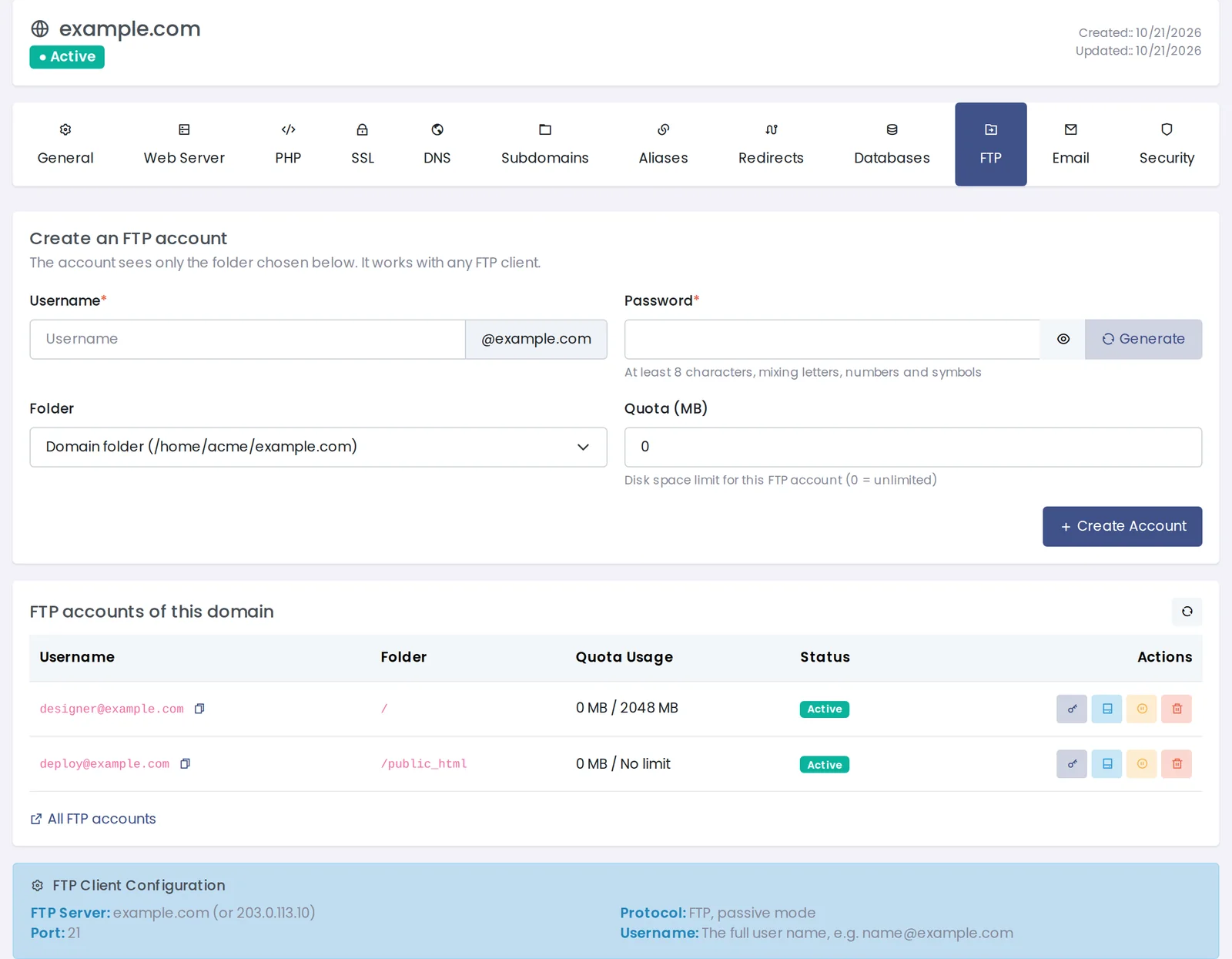
The new FTP tab on the domain page.
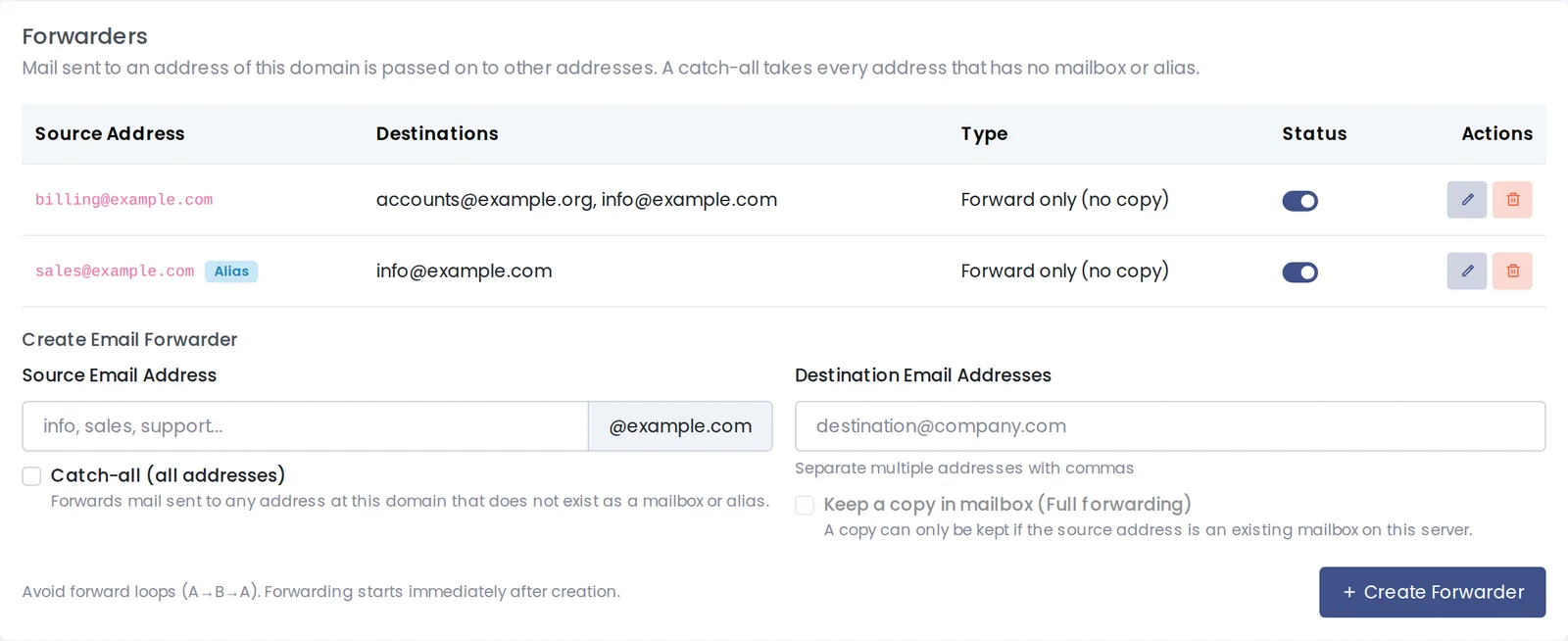
Forwarders and aliases on the Email tab.
Domain aliases also get a DNS zone of their own and can redirect to the main domain, and the "New FTP Account" shortcut in the domain list now creates the account for the domain's folder instead of the whole hosting account.
Security and Sign-In
- Login protection — an account is locked for a while after 15 failed panel logins within 15 minutes, from any addresses; addresses that have signed in to that account successfully are not affected, administrators are notified, and the three values are in Panel Settings › Rate limit. IP Blocking has a Panel logins tab.
- Fail2ban — the SSH jail follows the real SSH port, jail limits survive restarts, the IP whitelist reaches every jail, a new web scanner jail, and custom jails for the root administrator with a test against a sample line.
- ModSecurity — events show the visitor's IP (IPv6 included), the real time, the browser and all matched rules; the WAF page shows its status and has a bulk mode.
- Sessions — no more logouts with the panel open in several tabs or when the connection switches between IPv4 and IPv6.
Mail, Webmail and Migration
Binding a webmail session to the visitor's IP address is now a setting and is off by default, so people whose address changes on mobile networks stay signed in; one-click webmail login is more robust. Webmail sends through its own signed-in connection, and the sender address must belong to that email account; the same rule for mail programs is a switch in Email Settings › Postfix. A new email account created without a size gets the size the panel shows.
Panelica to Panelica migration now carries DNS records, subdomain names and their PHP versions, SSL records and the panel password, and zones migrated from a server behind NAT no longer point to the old server. As with any migration, check every site afterwards — pages, mail, databases, SSL and cron jobs — since some manual steps may still be needed.
Smaller Improvements and Fixes
| Area | Change |
|---|---|
| File manager | Preview shows text files, Edit from the preview loads the file, Open in Browser opens it, rename works in place (F2), and Enter confirms a delete |
| Subdomains | One add and edit window on both pages; the document root is never empty and saving no longer moves it |
| Domains | The root administrator can create a domain on a second server IP for an account; errors show the real reason in the panel's language |
| Languages | Languages added from the panel can have a flag in the top bar and on the login page |
| Updates | Reinstall installs the version of the panel's update channel and never an older one |
| Developer API | The API reference page is generated from the live list of endpoints; MySQL users are managed by their owner |
| Stability | PHP-FPM reloads wait until it is ready; a stopped Postfix is started instead of reloaded; configuration backups keep the newest five |
Frequently Asked Questions
How do I get these changes?
Open Support › System Updates and apply the updates, or use Update All. The panel interface update follows the panelica-server update it needs.
Does VPS Manager install itself with the update?
No. It is installed only when the root administrator opens VPS Manager and clicks Install; servers that never do are not changed.
Will my backups become slower after updating?
No. Low-resource mode stays off on servers that update, so backups run exactly as before until you choose a mode.
Do I need to do anything for my SSL certificates?
No. The next renewal uses the full list of names automatically. If a certificate is missing a subdomain today, Reissue on the SSL page lists it and adds it.
Can resellers or users move domains between accounts?
No, moving a domain to another account is reserved for the root administrator, who sees the full check before anything is moved.