Every WordPress Tool in One Place
Panelica includes the most comprehensive WordPress management toolkit available in any hosting panel. Eight dedicated sections cover everything from installation to security — no plugins or third-party tools needed.
Sites Dashboard
See all your WordPress installations at a glance. For each site you can:
- Auto-login — Jump straight into wp-admin with one click, no password needed
- Change admin password — Reset any WordPress user's password instantly
- Fix permissions — Repair file and folder permissions with one click
- Freeze / Unfreeze — Lock a site for maintenance, then unlock when ready
- Manage users — View and manage WordPress users directly from the panel
One-Click Install
Install WordPress on any domain, subdomain, or existing site. Choose your preferred PHP version, set up the database automatically, and configure advanced options — all in one step. Your site is ready in seconds.
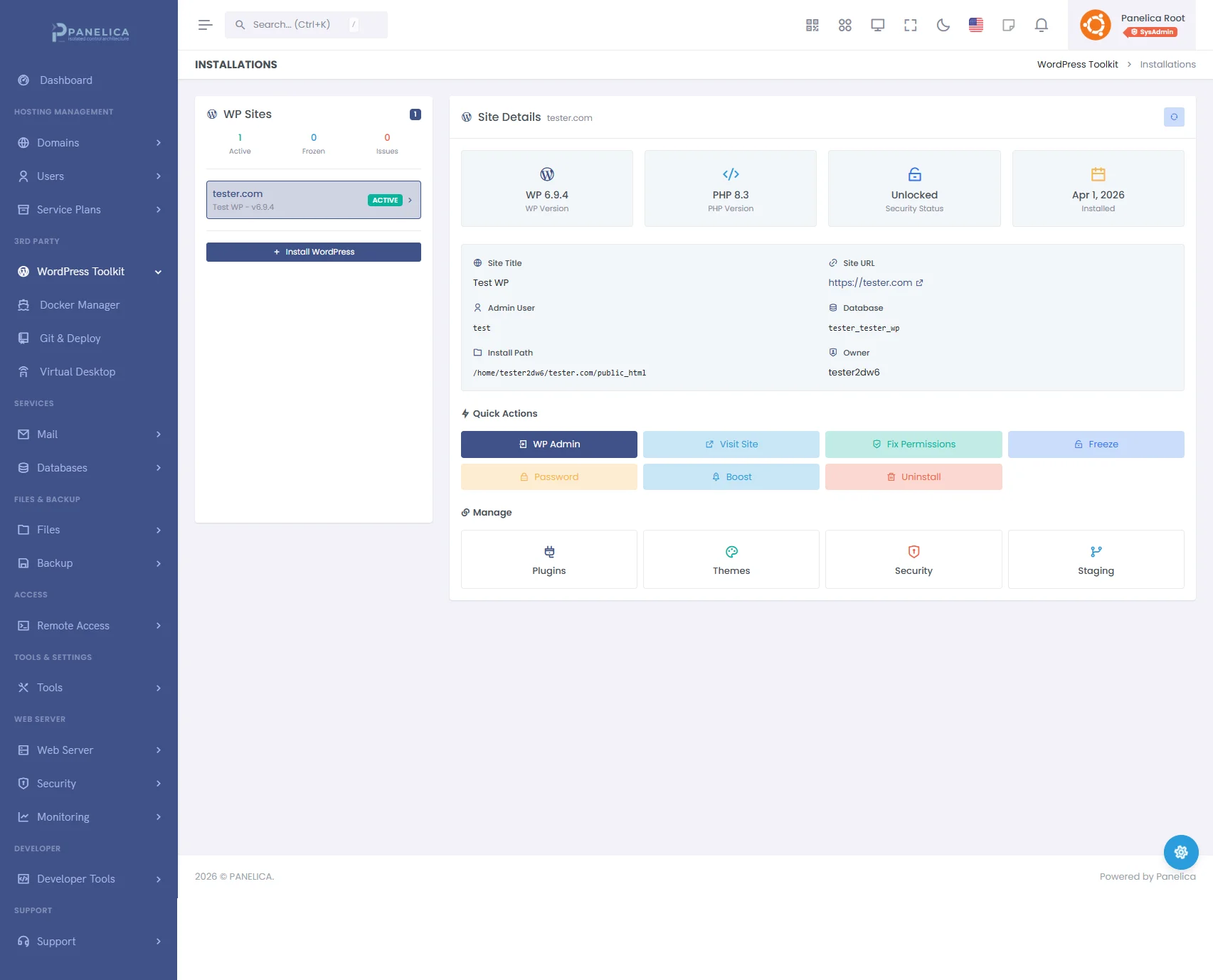
Panelica WordPress Toolkit — Complete WordPress management from your panel
Plugin & Theme Management
Manage plugins and themes across all your sites without logging into each one:
- Search & install from the WordPress repository
- Activate or deactivate plugins and themes
- Batch install — Install multiple plugins or themes at once
- Update all — Update every plugin or theme across all sites with a single click
- Remove unused — Clean up plugins and themes you no longer need
Centralized Updates
Never miss a WordPress update again. See all available updates for core, plugins, and themes across every site — and apply them all from one screen.
Security Toolkit
Protect your WordPress sites with built-in security tools:
- Security scan — Scan for vulnerabilities and misconfigurations
- Hardening — Apply security rules like disabling file editing, blocking XML-RPC, and hiding version info
- Suspicious file detection — Find and remove potentially malicious files
- Login attempt monitoring — Track who's trying to access your sites
- Security agent — Install the Panelica agent for real-time protection
Staging Environment
Test changes without risking your live site:
- Create staging copy — One click to clone any site to a staging environment
- Test safely — Try plugin updates, theme changes, or code modifications
- Promote to live — Push your staging changes to production when ready
- Sync back — Pull production data into staging for testing
WordPress Backups
Create, download, and restore WordPress-specific backups. Keep your sites protected against data loss with on-demand or scheduled backups. Restore any backup with a single click.
All Included. No Extra Plugins.
Other panels require paid add-ons for WordPress management. Panelica includes everything — from installation to staging to security — in every license.
Start Starter — free and manage your WordPress sites the way they should be managed.